> ## Documentation Index
> Fetch the complete documentation index at: https://docs.chatfeatured.com/llms.txt
> Use this file to discover all available pages before exploring further.
# How to: AEO Agent
> Master the contextual and general AEO agents for content generation and strategy
## Overview
ChatFeatured's AEO (Answer Engine Optimization) Agent comes in two modes:
Opened from specific tabs (like Articles) for task-specific work. Best for content generation, optimization, and variations.
Accessed from main sidebar for strategy and high-level insights. Best for analytics, planning, and performance review.
Using the right mode for your task makes a huge difference in output quality.
***
## Mode 1: Contextual Agent (Task-Specific)
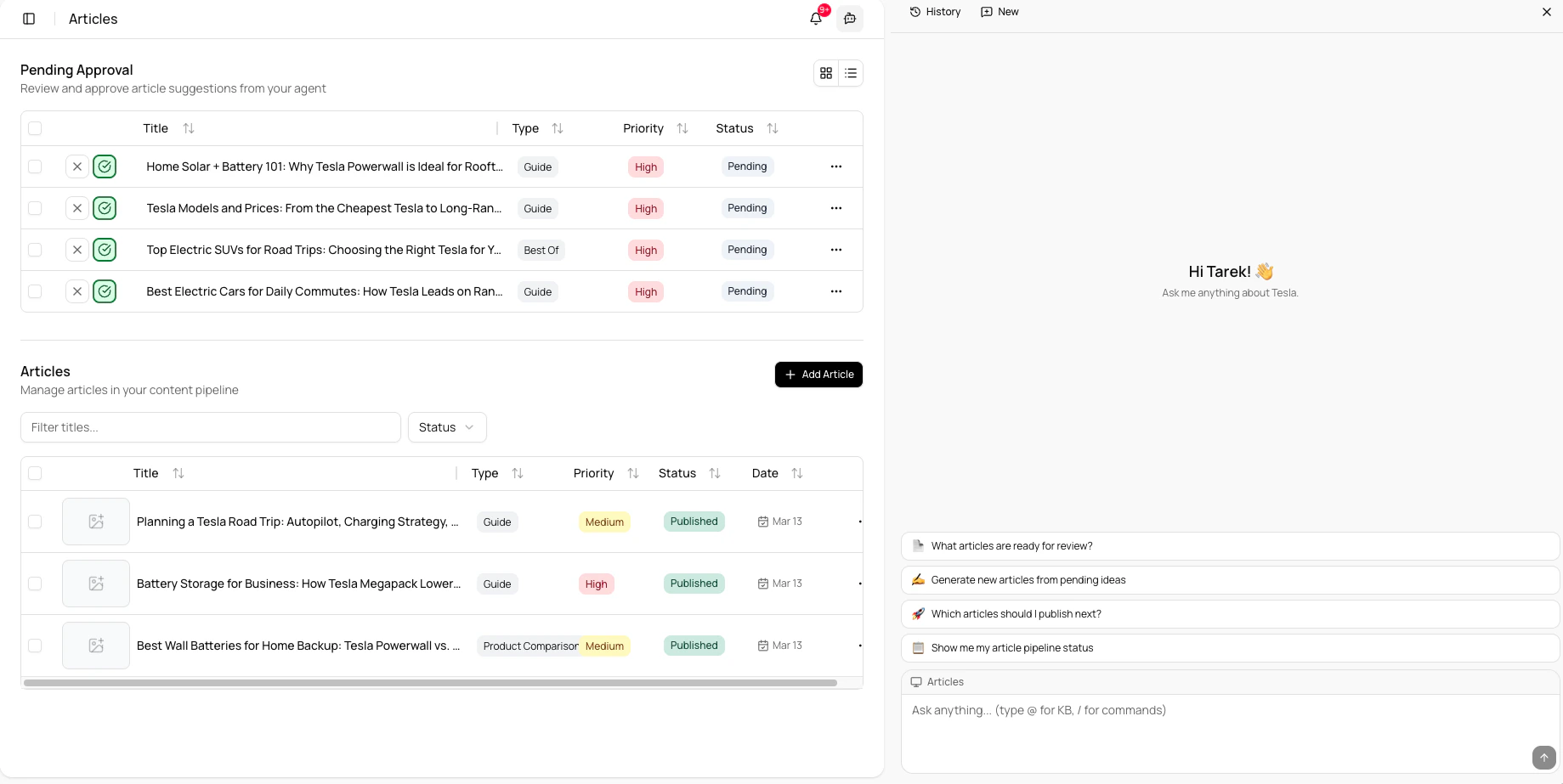 The contextual agent is available in **every tab** (Prompts, Articles, Tasks, Site Audit, Knowledge Base, etc.), but works best in **Prompts** and **Articles** for content generation.
### Best Use Cases
* **Prompts tab:** Generate or refine prompts for the Agent
* **Articles tab:** Generate, improve, or optimize articles
* **Other tabs:** Get contextual help with tasks, audit suggestions, etc.
### How to Access
1. Navigate to any tab in ChatFeatured
2. Click the **Agent icon** (in the top-right)
3. A sidebar opens with agent features tailored to that specific context
The contextual agent understands your content, style, and context within that tab. This makes it much better at generating work that matches your voice and requirements.
### Step-by-Step Workflows
**In Prompts Tab (Generate/Refine Prompts):**
1. Go to **Prompts** tab
2. Click **Agent icon** → Contextual sidebar opens
3. Ask: *"Create a prompt for generating B2B SaaS content that ranks well with AI crawlers"*
4. The agent generates a customized prompt based on your existing prompts
5. Review, refine, and save as a new prompt **In Articles Tab (Generate/Improve Articles):**
6. Go to **Articles** tab
7. Click **Agent icon** → Contextual sidebar opens
8. Describe what you want: *"Generate a guide on AI content creation for B2B blogs"*
9. The agent understands your article library and can:
* Generate new content in your style
* Suggest topics based on what's missing
* Improve drafts you paste in
10. Review output in the sidebar, then publish or iterate
### Best Practices for Contextual Agent
* Be specific about topic, audience, and length
* Reference your existing work: *"Create this like our best-performing 'AI Trends' article"*
* Ask for variations: *"Give me 3 headline options"*
* Use for optimization: *"This article isn't ranking. Suggest improvements for AEO"*
* Iterate on outputs: *"Make it more technical"* or *"Simplify the language"*
The more context you provide (target audience, word count, style preference), the better the agent's output. Generic requests get generic results.
***
## Mode 2: General Agent (Strategy & Insights)
The contextual agent is available in **every tab** (Prompts, Articles, Tasks, Site Audit, Knowledge Base, etc.), but works best in **Prompts** and **Articles** for content generation.
### Best Use Cases
* **Prompts tab:** Generate or refine prompts for the Agent
* **Articles tab:** Generate, improve, or optimize articles
* **Other tabs:** Get contextual help with tasks, audit suggestions, etc.
### How to Access
1. Navigate to any tab in ChatFeatured
2. Click the **Agent icon** (in the top-right)
3. A sidebar opens with agent features tailored to that specific context
The contextual agent understands your content, style, and context within that tab. This makes it much better at generating work that matches your voice and requirements.
### Step-by-Step Workflows
**In Prompts Tab (Generate/Refine Prompts):**
1. Go to **Prompts** tab
2. Click **Agent icon** → Contextual sidebar opens
3. Ask: *"Create a prompt for generating B2B SaaS content that ranks well with AI crawlers"*
4. The agent generates a customized prompt based on your existing prompts
5. Review, refine, and save as a new prompt **In Articles Tab (Generate/Improve Articles):**
6. Go to **Articles** tab
7. Click **Agent icon** → Contextual sidebar opens
8. Describe what you want: *"Generate a guide on AI content creation for B2B blogs"*
9. The agent understands your article library and can:
* Generate new content in your style
* Suggest topics based on what's missing
* Improve drafts you paste in
10. Review output in the sidebar, then publish or iterate
### Best Practices for Contextual Agent
* Be specific about topic, audience, and length
* Reference your existing work: *"Create this like our best-performing 'AI Trends' article"*
* Ask for variations: *"Give me 3 headline options"*
* Use for optimization: *"This article isn't ranking. Suggest improvements for AEO"*
* Iterate on outputs: *"Make it more technical"* or *"Simplify the language"*
The more context you provide (target audience, word count, style preference), the better the agent's output. Generic requests get generic results.
***
## Mode 2: General Agent (Strategy & Insights)
 ### When to Use
* Understanding overall performance trends
* Summarizing analytics
* Strategic planning and brainstorming
* Cross-functional questions about your content
### How to Access
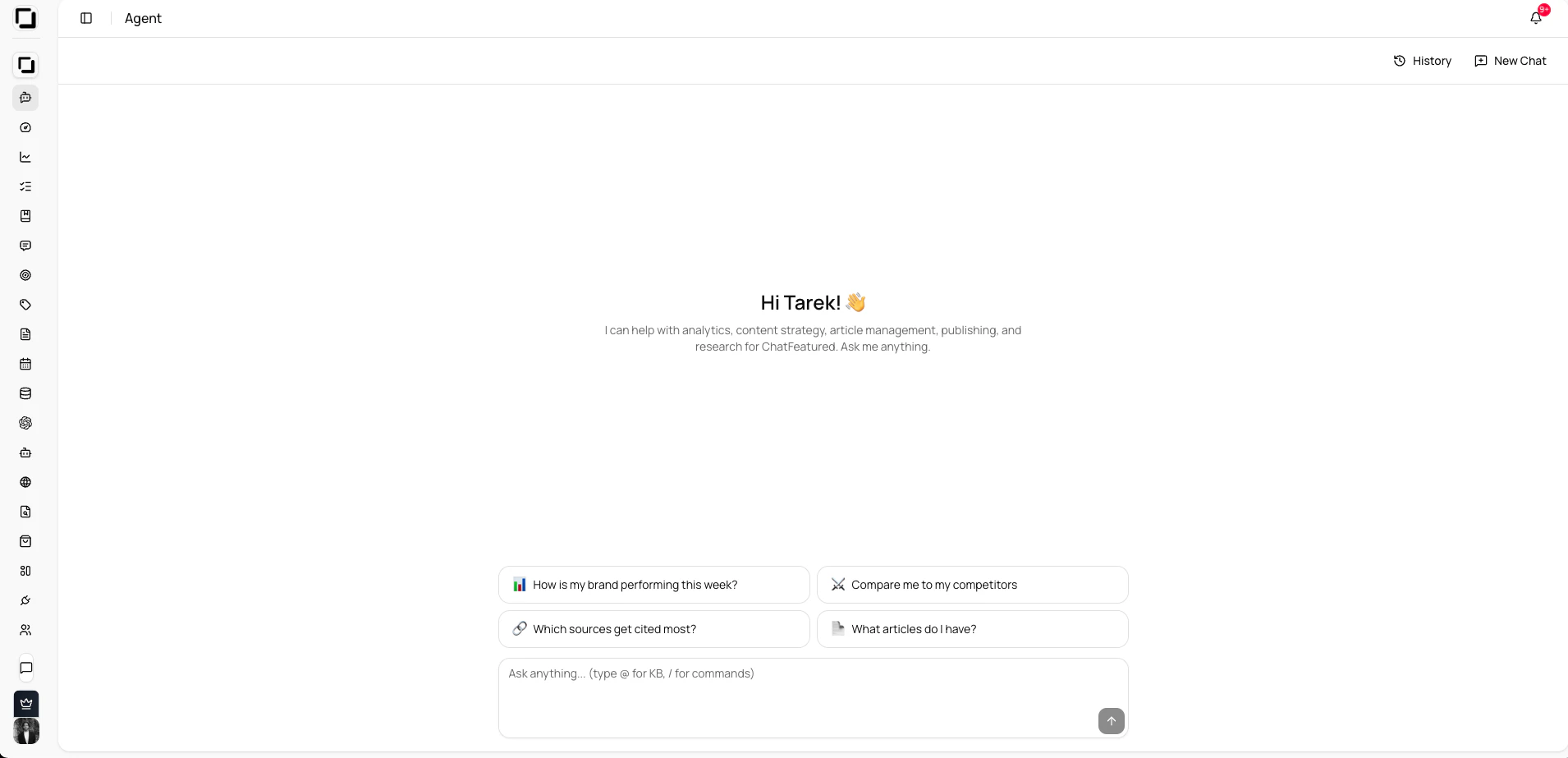
1. Click the **Agent icon** in the main sidebar (not from a specific tab)
2. Sidebar opens with general ChatFeatured context
The general agent has access to your full content library and performance data across all articles. Use it for bird's-eye-view questions.
### Step-by-Step: Analyze Performance
1. Open **General Agent** from sidebar
2. Ask: *"Summarize how our articles are performing with AI crawlers this month"*
3. Agent pulls from your analytics across all content
4. Get insights like:
* Which topics AI engines are crawling most
* Gaps in your AEO strategy
* Recommendations for new content angles
### Best Practices for General Agent
* Ask high-level questions: *"What's our biggest opportunity for AI visibility?"*
* Get strategic recommendations: *"Which content pillar should we invest in next?"*
* Use for planning: *"Based on our performance, what topics should we target?"*
* Request summaries: *"Give me a weekly digest of AI crawler activity"*
***
## Quick Reference: Which Mode?
| Task | Mode | Tab | Example |
| -------------------------- | -------------- | ---------------- | ------------------------------------------------ |
| Generate/refine prompts | **Contextual** | Prompts | "Create a prompt for AI-optimized content" |
| Write/improve articles | **Contextual** | Articles | "Generate a 1500-word guide on..." |
| Get contextual help | **Contextual** | Any tab | Ask for assistance within that context |
| Analyze performance trends | **General** | Sidebar | "Which topics are getting most crawler traffic?" |
| Create content variations | **Contextual** | Articles/Prompts | "Give me 5 headline options" |
| Strategic planning | **General** | Sidebar | "What's our AEO strategy gap?" |
| Optimize existing content | **Contextual** | Articles | "Improve this for AI visibility" |
| Understand analytics | **General** | Sidebar | "Summarize this month's trends" |
***
## General Best Practices
* **Be clear and specific** — "Generate a 1500-word guide on B2B SaaS content strategy" beats "write something"
* **Use the right mode** — Contextual for execution, General for strategy
* **Provide context** — Tell the agent your audience, goals, and constraints
* **Iterate, don't settle** — Ask for variations if the first output isn't perfect
* **Reference existing work** — *"Like our article on X, but for Y audience"* gives better results
* **Ask follow-ups** — The agent remembers context, so refine your request incrementally
Don't rely on the agent for one-shot outputs. The best results come from iterating—ask for changes, variations, or improvements until it matches your vision.
***
## Common Workflows
Perfect for quickly creating new articles in bulk.
1. Open **Contextual Agent** in Articles tab
2. Describe topic and requirements
3. Review generated content
4. Ask for variations or improvements
5. Publish or schedule **Time:** 10-15 minutes per article\
**Best for:** Scaling content production
Use this to understand what's working and plan next week.
1. Open **General Agent** from sidebar
2. Ask: *"What happened with our content this week?"*
3. Review performance insights
4. Ask follow-up questions about opportunities
5. Plan next week's topics based on insights **Time:** 20-30 minutes\
**Best for:** Strategic planning and optimization
Improve underperforming articles for better AI visibility.
1. Open **Contextual Agent** in Articles tab
2. Paste underperforming article
3. Ask: *"How can I improve this for AI crawler visibility?"*
4. Apply suggestions to article
5. Republish and track performance **Time:** 15-20 minutes per article\
**Best for:** Improving existing content ROI
Find what topics you're missing compared to your competitors.
1. Open **General Agent** from sidebar
2. Ask: *"What content topics should we be covering that we're missing?"*
3. Get recommendations based on your niche
4. Discuss which topics align with your strategy
5. Plan new articles in Contextual Agent **Time:** 15 minutes for analysis\
**Best for:** Strategic content planning
***
## Tips by Use Case
### For Content Creators
Use **Contextual Agent in Articles tab** — It's your personal writing assistant. Ask for drafts, outlines, variations, or improvements. It learns your style with each interaction.
Use **Contextual Agent in Prompts tab** — Refine and create new prompts that guide the Agent to generate better content aligned with your voice and goals.
### For Content Strategists
Use **General Agent** for big-picture questions. Understand trends, identify gaps, and make data-driven decisions about what to create next.
Use **Contextual Agent in any tab** for tactical help—Site Audit for optimization suggestions, Tasks for workflow assistance, Knowledge Base for content organization.
### For Product Managers
Use **General Agent** for performance summaries. Get weekly digests on how your content is performing with AI crawlers to inform product decisions.
***
## Pro Tips
**Batch similar requests** — If you need 5 articles, tell the agent to generate all 5 at once rather than one-by-one. It's faster and more consistent.
**Use follow-ups smartly** — The agent remembers context. Instead of repeating details, just ask: *"Now make it 500 words instead of 1000"* or *"Add a section on X"*
**Reference your best work** — The agent can analyze your top-performing articles and mimic their structure and tone for new pieces.
**Never use generic prompts** — "Write an article" or "Generate content" will give mediocre results. Specific prompts get specific, high-quality results.
***
## Troubleshooting
The agent learns from examples. Try asking: *"Generate this in the style of \[your top article]"* or *"Make it sound more \[professional/conversational/technical]"*
Provide more detail upfront: *"Our audience is B2B SaaS marketers, mostly directors of marketing. They care about ROI and data. Generate..."*
Be more specific: Instead of *"Write about AI"*, try *"Write a technical deep-dive on RAG (Retrieval-Augmented Generation) for content creators"*
Make sure you're in the right place:
* **Contextual:** Must be opened FROM a specific tab (Articles, Projects, etc.)
* **General:** Must be opened from the main sidebar, not from within a tab
***
This structure keeps your team using the right tool for each job—faster results, better quality.
### When to Use
* Understanding overall performance trends
* Summarizing analytics
* Strategic planning and brainstorming
* Cross-functional questions about your content
### How to Access
1. Click the **Agent icon** in the main sidebar (not from a specific tab)
2. Sidebar opens with general ChatFeatured context
The general agent has access to your full content library and performance data across all articles. Use it for bird's-eye-view questions.
### Step-by-Step: Analyze Performance
1. Open **General Agent** from sidebar
2. Ask: *"Summarize how our articles are performing with AI crawlers this month"*
3. Agent pulls from your analytics across all content
4. Get insights like:
* Which topics AI engines are crawling most
* Gaps in your AEO strategy
* Recommendations for new content angles
### Best Practices for General Agent
* Ask high-level questions: *"What's our biggest opportunity for AI visibility?"*
* Get strategic recommendations: *"Which content pillar should we invest in next?"*
* Use for planning: *"Based on our performance, what topics should we target?"*
* Request summaries: *"Give me a weekly digest of AI crawler activity"*
***
## Quick Reference: Which Mode?
| Task | Mode | Tab | Example |
| -------------------------- | -------------- | ---------------- | ------------------------------------------------ |
| Generate/refine prompts | **Contextual** | Prompts | "Create a prompt for AI-optimized content" |
| Write/improve articles | **Contextual** | Articles | "Generate a 1500-word guide on..." |
| Get contextual help | **Contextual** | Any tab | Ask for assistance within that context |
| Analyze performance trends | **General** | Sidebar | "Which topics are getting most crawler traffic?" |
| Create content variations | **Contextual** | Articles/Prompts | "Give me 5 headline options" |
| Strategic planning | **General** | Sidebar | "What's our AEO strategy gap?" |
| Optimize existing content | **Contextual** | Articles | "Improve this for AI visibility" |
| Understand analytics | **General** | Sidebar | "Summarize this month's trends" |
***
## General Best Practices
* **Be clear and specific** — "Generate a 1500-word guide on B2B SaaS content strategy" beats "write something"
* **Use the right mode** — Contextual for execution, General for strategy
* **Provide context** — Tell the agent your audience, goals, and constraints
* **Iterate, don't settle** — Ask for variations if the first output isn't perfect
* **Reference existing work** — *"Like our article on X, but for Y audience"* gives better results
* **Ask follow-ups** — The agent remembers context, so refine your request incrementally
Don't rely on the agent for one-shot outputs. The best results come from iterating—ask for changes, variations, or improvements until it matches your vision.
***
## Common Workflows
Perfect for quickly creating new articles in bulk.
1. Open **Contextual Agent** in Articles tab
2. Describe topic and requirements
3. Review generated content
4. Ask for variations or improvements
5. Publish or schedule **Time:** 10-15 minutes per article\
**Best for:** Scaling content production
Use this to understand what's working and plan next week.
1. Open **General Agent** from sidebar
2. Ask: *"What happened with our content this week?"*
3. Review performance insights
4. Ask follow-up questions about opportunities
5. Plan next week's topics based on insights **Time:** 20-30 minutes\
**Best for:** Strategic planning and optimization
Improve underperforming articles for better AI visibility.
1. Open **Contextual Agent** in Articles tab
2. Paste underperforming article
3. Ask: *"How can I improve this for AI crawler visibility?"*
4. Apply suggestions to article
5. Republish and track performance **Time:** 15-20 minutes per article\
**Best for:** Improving existing content ROI
Find what topics you're missing compared to your competitors.
1. Open **General Agent** from sidebar
2. Ask: *"What content topics should we be covering that we're missing?"*
3. Get recommendations based on your niche
4. Discuss which topics align with your strategy
5. Plan new articles in Contextual Agent **Time:** 15 minutes for analysis\
**Best for:** Strategic content planning
***
## Tips by Use Case
### For Content Creators
Use **Contextual Agent in Articles tab** — It's your personal writing assistant. Ask for drafts, outlines, variations, or improvements. It learns your style with each interaction.
Use **Contextual Agent in Prompts tab** — Refine and create new prompts that guide the Agent to generate better content aligned with your voice and goals.
### For Content Strategists
Use **General Agent** for big-picture questions. Understand trends, identify gaps, and make data-driven decisions about what to create next.
Use **Contextual Agent in any tab** for tactical help—Site Audit for optimization suggestions, Tasks for workflow assistance, Knowledge Base for content organization.
### For Product Managers
Use **General Agent** for performance summaries. Get weekly digests on how your content is performing with AI crawlers to inform product decisions.
***
## Pro Tips
**Batch similar requests** — If you need 5 articles, tell the agent to generate all 5 at once rather than one-by-one. It's faster and more consistent.
**Use follow-ups smartly** — The agent remembers context. Instead of repeating details, just ask: *"Now make it 500 words instead of 1000"* or *"Add a section on X"*
**Reference your best work** — The agent can analyze your top-performing articles and mimic their structure and tone for new pieces.
**Never use generic prompts** — "Write an article" or "Generate content" will give mediocre results. Specific prompts get specific, high-quality results.
***
## Troubleshooting
The agent learns from examples. Try asking: *"Generate this in the style of \[your top article]"* or *"Make it sound more \[professional/conversational/technical]"*
Provide more detail upfront: *"Our audience is B2B SaaS marketers, mostly directors of marketing. They care about ROI and data. Generate..."*
Be more specific: Instead of *"Write about AI"*, try *"Write a technical deep-dive on RAG (Retrieval-Augmented Generation) for content creators"*
Make sure you're in the right place:
* **Contextual:** Must be opened FROM a specific tab (Articles, Projects, etc.)
* **General:** Must be opened from the main sidebar, not from within a tab
***
This structure keeps your team using the right tool for each job—faster results, better quality.