> ## Documentation Index
> Fetch the complete documentation index at: https://docs.chatfeatured.com/llms.txt
> Use this file to discover all available pages before exploring further.
# Google Analytics 4 (GA4)
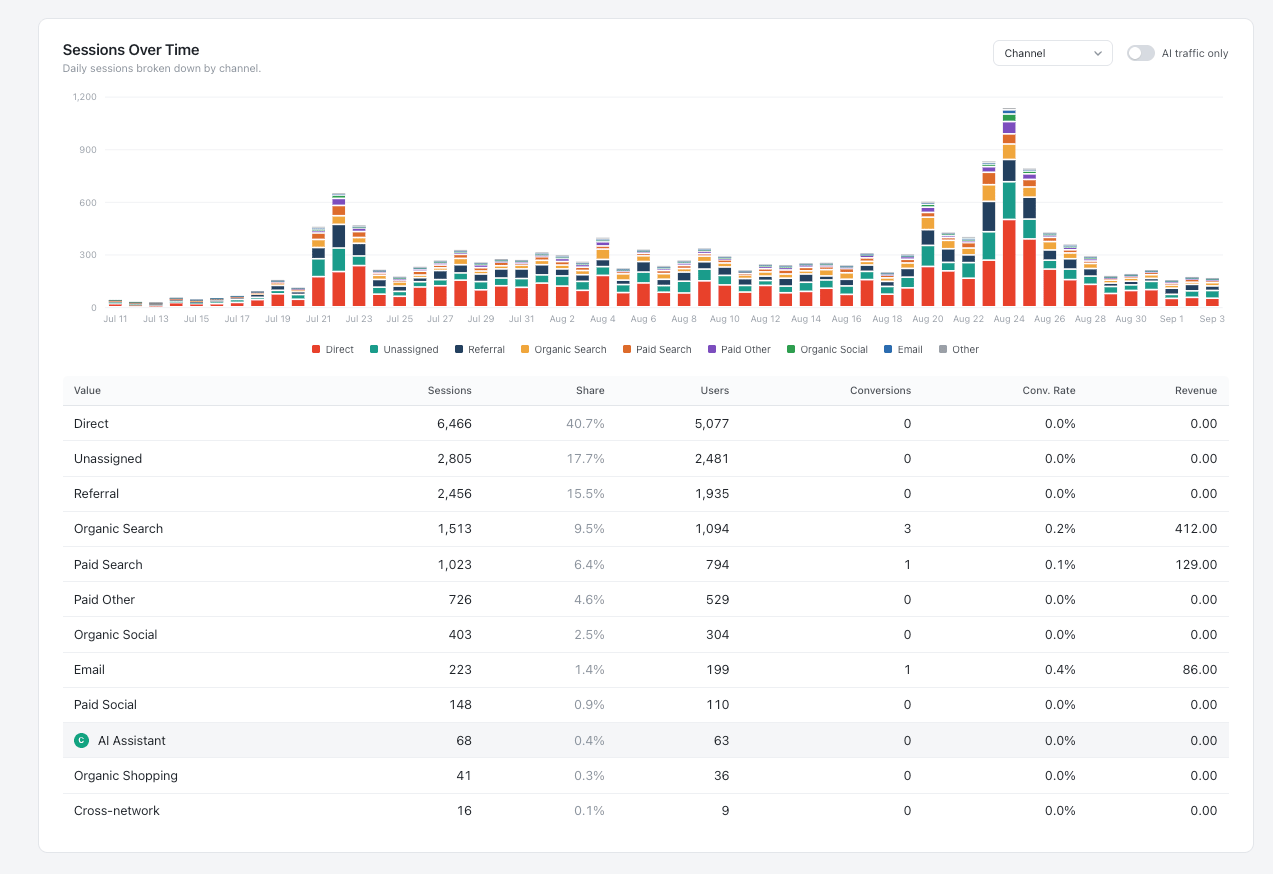
> Connect your Google Analytics 4 property to track AI referral traffic, measure downstream conversions from AI search engines, and correlate AI visibility with website visits.
The **Google Analytics 4 (GA4)** integration connects your live web analytics to ChatFeatured. By linking your GA4 property, you can measure the actual downstream impact of your AI search optimization: tracking referral traffic from AI answer engines (`chatgpt.com`, `perplexity.ai`, `claude.ai`, etc.), evaluating landing page engagement, and measuring conversions driven by AI citations.
 ***
## Why Connect GA4 to ChatFeatured?
While ChatFeatured monitors your brand's presence and citations inside AI model answers, GA4 reveals what happens after users click through:
Automatically isolate and track sessions originating from AI engines including ChatGPT, Perplexity, Claude, Gemini, and Copilot.
Measure how changes in prompt visibility and citation counts translate into real user visits over time.
Identify which articles, comparison pages, and documentation URLs attract the highest volume of AI-referred traffic.
Ask the [AEO Agent](/ai-agents/overview) natural language questions about your web traffic without leaving ChatFeatured.
***
## What Data ChatFeatured Analyzes
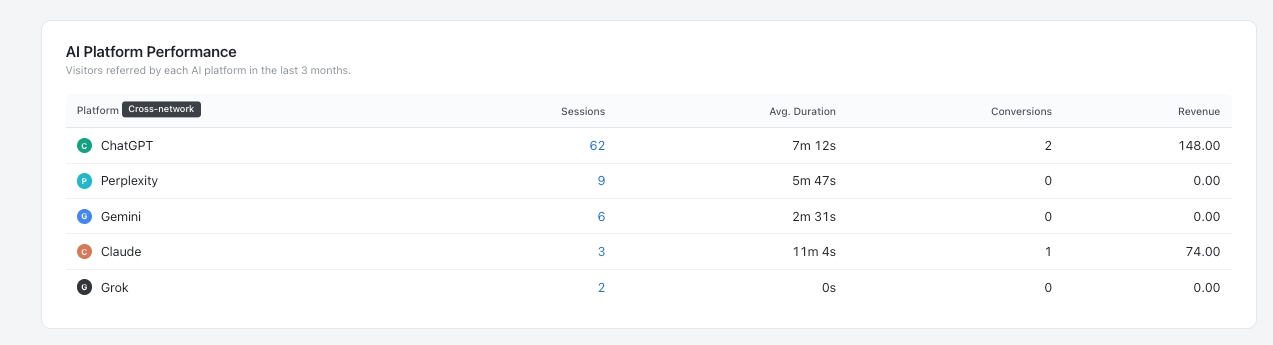
Once connected, ChatFeatured filters and evaluates your GA4 data across several key dimensions:
* **AI Referral Domains:** Sessions and active users coming from AI platforms, including:
* `chatgpt.com` / `chat.openai.com`
* `perplexity.ai`
* `claude.ai`
* `gemini.google.com`
* `copilot.microsoft.com`
* **Engagement Metrics:** Average session duration, engagement rate, bounce rate, and pages per session for AI visitors vs. standard organic search.
* **Landing Page Performance:** URLs receiving direct click-throughs from AI citations.
* **Conversion & Event Tracking:** Key conversion events (signups, demo requests, purchases) attributed to AI referral channels.
***
## Why Connect GA4 to ChatFeatured?
While ChatFeatured monitors your brand's presence and citations inside AI model answers, GA4 reveals what happens after users click through:
Automatically isolate and track sessions originating from AI engines including ChatGPT, Perplexity, Claude, Gemini, and Copilot.
Measure how changes in prompt visibility and citation counts translate into real user visits over time.
Identify which articles, comparison pages, and documentation URLs attract the highest volume of AI-referred traffic.
Ask the [AEO Agent](/ai-agents/overview) natural language questions about your web traffic without leaving ChatFeatured.
***
## What Data ChatFeatured Analyzes
Once connected, ChatFeatured filters and evaluates your GA4 data across several key dimensions:
* **AI Referral Domains:** Sessions and active users coming from AI platforms, including:
* `chatgpt.com` / `chat.openai.com`
* `perplexity.ai`
* `claude.ai`
* `gemini.google.com`
* `copilot.microsoft.com`
* **Engagement Metrics:** Average session duration, engagement rate, bounce rate, and pages per session for AI visitors vs. standard organic search.
* **Landing Page Performance:** URLs receiving direct click-throughs from AI citations.
* **Conversion & Event Tracking:** Key conversion events (signups, demo requests, purchases) attributed to AI referral channels.
 ***
## Setup Instructions
Connecting GA4 requires a Google Account with at least **Viewer** permissions on the target GA4 property.
In your ChatFeatured dashboard, navigate to **Integrations** in the left sidebar and select **Google Analytics 4**.
Click **Connect Google Analytics**. You will be redirected to Google’s secure OAuth consent screen.
Select the Google account that manages your website's analytics. Grant the requested read-only scope (`analytics.readonly`).
ChatFeatured requests **read-only** access strictly to pull aggregated traffic reports and session metrics. ChatFeatured cannot alter your tracking tags, delete properties, or modify your GA4 configurations.
After redirecting back to ChatFeatured:
* Select your **GA4 Property** from the dropdown.
* Select your active **Web Data Stream**.
* Click **Save & Sync**.
***
## Querying GA4 with the AEO Agent
Once connected, the [AEO Agent](/ai-agents/overview) can analyze your web traffic in real time. You can ask questions such as:
* *"How much referral traffic did we receive from ChatGPT and Perplexity over the last 30 days?"*
* *"What are our top 5 landing pages receiving traffic from AI search engines?"*
* *"Compare our AI referral traffic this month versus last month."*
* *"Did our new comparison article generate any referral traffic from ChatGPT since being published?"*
* *"Which articles published through ChatFeatured have the highest engagement rate from AI visitors?"*
* *"Is our increase in Perplexity citations correlating with more visits to our documentation?"*
***
## Troubleshooting & FAQ
Citations in AI responses indicate that an answer engine used your page as a source to construct an answer. Not every user who reads an AI answer clicks through the cited source link. A high citation count with moderate referral traffic is normal across conversational search engines.
Google Analytics 4 has a standard data processing latency of **24 to 48 hours** for full session attribution. Data from today or yesterday may be incomplete in GA4 until Google finishes processing data streams.
Yes. Go to **Integrations > Google Analytics 4**, click **Manage Connection**, and choose **Disconnect** or select a different property from your account.
***
## Related Guides
Track index status, sitemaps, and organic search impressions.
Monitor brand visibility, sentiment, and citations across 7 AI models.
Monitor real-time AI bot crawl activity via Cloudflare or Vercel logs.
Learn how the conversational agent uses integrated data to provide actionable advice.
***
## Setup Instructions
Connecting GA4 requires a Google Account with at least **Viewer** permissions on the target GA4 property.
In your ChatFeatured dashboard, navigate to **Integrations** in the left sidebar and select **Google Analytics 4**.
Click **Connect Google Analytics**. You will be redirected to Google’s secure OAuth consent screen.
Select the Google account that manages your website's analytics. Grant the requested read-only scope (`analytics.readonly`).
ChatFeatured requests **read-only** access strictly to pull aggregated traffic reports and session metrics. ChatFeatured cannot alter your tracking tags, delete properties, or modify your GA4 configurations.
After redirecting back to ChatFeatured:
* Select your **GA4 Property** from the dropdown.
* Select your active **Web Data Stream**.
* Click **Save & Sync**.
***
## Querying GA4 with the AEO Agent
Once connected, the [AEO Agent](/ai-agents/overview) can analyze your web traffic in real time. You can ask questions such as:
* *"How much referral traffic did we receive from ChatGPT and Perplexity over the last 30 days?"*
* *"What are our top 5 landing pages receiving traffic from AI search engines?"*
* *"Compare our AI referral traffic this month versus last month."*
* *"Did our new comparison article generate any referral traffic from ChatGPT since being published?"*
* *"Which articles published through ChatFeatured have the highest engagement rate from AI visitors?"*
* *"Is our increase in Perplexity citations correlating with more visits to our documentation?"*
***
## Troubleshooting & FAQ
Citations in AI responses indicate that an answer engine used your page as a source to construct an answer. Not every user who reads an AI answer clicks through the cited source link. A high citation count with moderate referral traffic is normal across conversational search engines.
Google Analytics 4 has a standard data processing latency of **24 to 48 hours** for full session attribution. Data from today or yesterday may be incomplete in GA4 until Google finishes processing data streams.
Yes. Go to **Integrations > Google Analytics 4**, click **Manage Connection**, and choose **Disconnect** or select a different property from your account.
***
## Related Guides
Track index status, sitemaps, and organic search impressions.
Monitor brand visibility, sentiment, and citations across 7 AI models.
Monitor real-time AI bot crawl activity via Cloudflare or Vercel logs.
Learn how the conversational agent uses integrated data to provide actionable advice.