> ## Documentation Index
> Fetch the complete documentation index at: https://docs.chatfeatured.com/llms.txt
> Use this file to discover all available pages before exploring further.
# Answer Engine Analytics
> Understand your AI visibility trends and performance
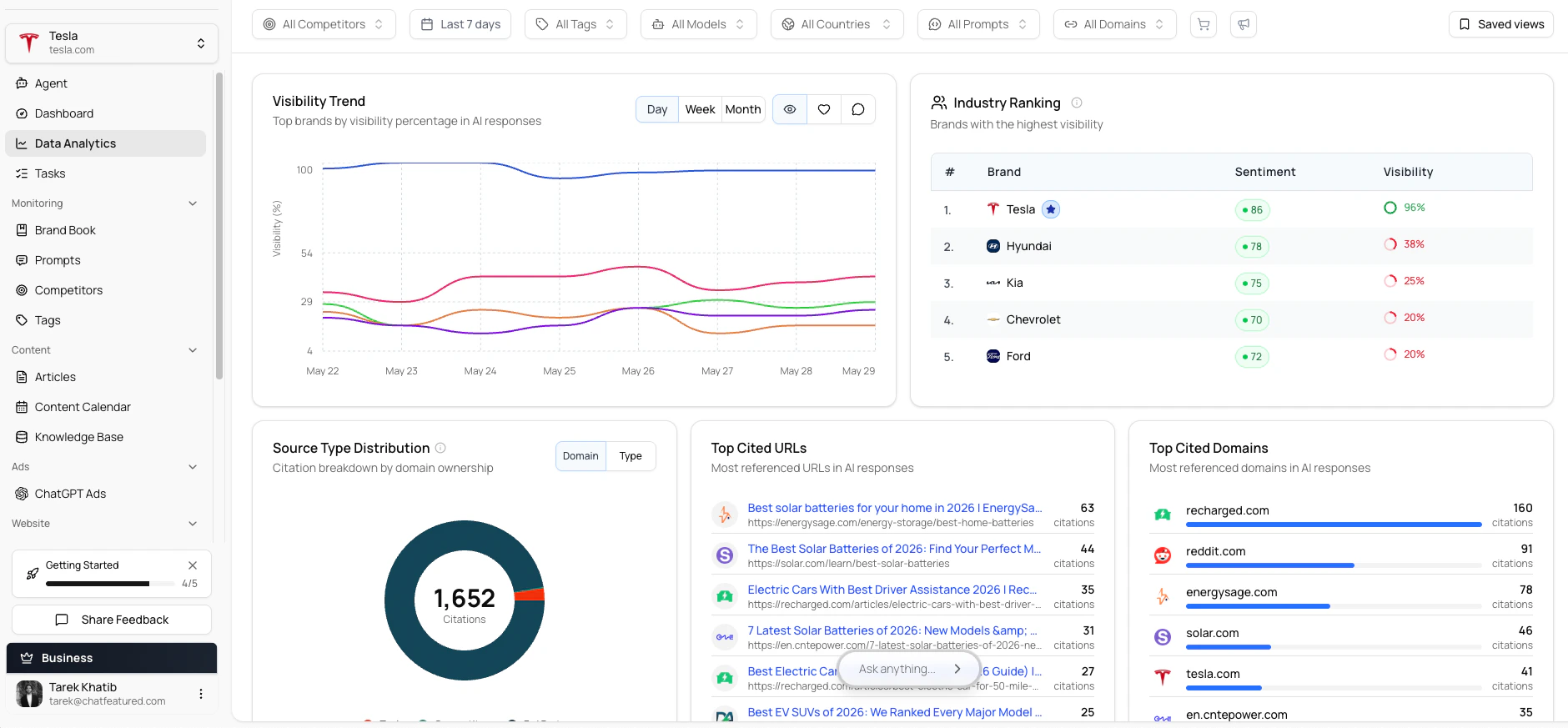
The Data Analytics dashboard provides insights into your brand's AI visibility over time. Use it to track trends, identify opportunities, and measure the impact of your optimization efforts.
 ## Overview Dashboard
The Analytics overview shows your key metrics at a glance:
### Key Metrics
The percentage of prompts where your brand was mentioned. Track this over time to measure overall visibility.
The overall tone of how AI models discuss your brand—positive, neutral, or negative.
How your mention rate compares to tracked competitors across the same prompts.
Your visibility broken down by individual AI answer engine.
## Time-Based Analysis
### Selecting Date Ranges
Use the date picker to analyze specific time periods:
* **Last 7 days**: Recent performance snapshot
* **Last 30 days**: Monthly trends
* **Last 90 days**: Quarterly analysis
* **Custom range**: Specific period analysis
### Trend Charts
The trend chart shows your mention rate over time. Look for:
* **Upward trends**: Your visibility is improving
* **Downward trends**: Visibility may be declining
* **Spikes or drops**: Correlate with external events or optimizations
## Performance by AI Engine
Different AI engines may mention your brand at different rates. The engine breakdown shows:
| Engine | Your Mention Rate | Competitor Avg |
| ---------- | ----------------- | -------------- |
| ChatGPT | 45% | 32% |
| Claude | 52% | 38% |
| Perplexity | 61% | 45% |
| ... | ... | ... |
Use this to identify:
* **Strong engines**: Where you have good visibility
* **Weak engines**: Opportunities for improvement
* **Competitive gaps**: Where competitors outperform you
## Geographic Analysis
If you're tracking prompts across multiple countries, the geographic view shows:
* Mention rates by country
* Regional variations in competitor performance
* Market-specific opportunities
AI responses often vary significantly by region. A brand might have strong visibility in the US but lower visibility in European markets.
## Prompt-Level Analytics
## Overview Dashboard
The Analytics overview shows your key metrics at a glance:
### Key Metrics
The percentage of prompts where your brand was mentioned. Track this over time to measure overall visibility.
The overall tone of how AI models discuss your brand—positive, neutral, or negative.
How your mention rate compares to tracked competitors across the same prompts.
Your visibility broken down by individual AI answer engine.
## Time-Based Analysis
### Selecting Date Ranges
Use the date picker to analyze specific time periods:
* **Last 7 days**: Recent performance snapshot
* **Last 30 days**: Monthly trends
* **Last 90 days**: Quarterly analysis
* **Custom range**: Specific period analysis
### Trend Charts
The trend chart shows your mention rate over time. Look for:
* **Upward trends**: Your visibility is improving
* **Downward trends**: Visibility may be declining
* **Spikes or drops**: Correlate with external events or optimizations
## Performance by AI Engine
Different AI engines may mention your brand at different rates. The engine breakdown shows:
| Engine | Your Mention Rate | Competitor Avg |
| ---------- | ----------------- | -------------- |
| ChatGPT | 45% | 32% |
| Claude | 52% | 38% |
| Perplexity | 61% | 45% |
| ... | ... | ... |
Use this to identify:
* **Strong engines**: Where you have good visibility
* **Weak engines**: Opportunities for improvement
* **Competitive gaps**: Where competitors outperform you
## Geographic Analysis
If you're tracking prompts across multiple countries, the geographic view shows:
* Mention rates by country
* Regional variations in competitor performance
* Market-specific opportunities
AI responses often vary significantly by region. A brand might have strong visibility in the US but lower visibility in European markets.
## Prompt-Level Analytics
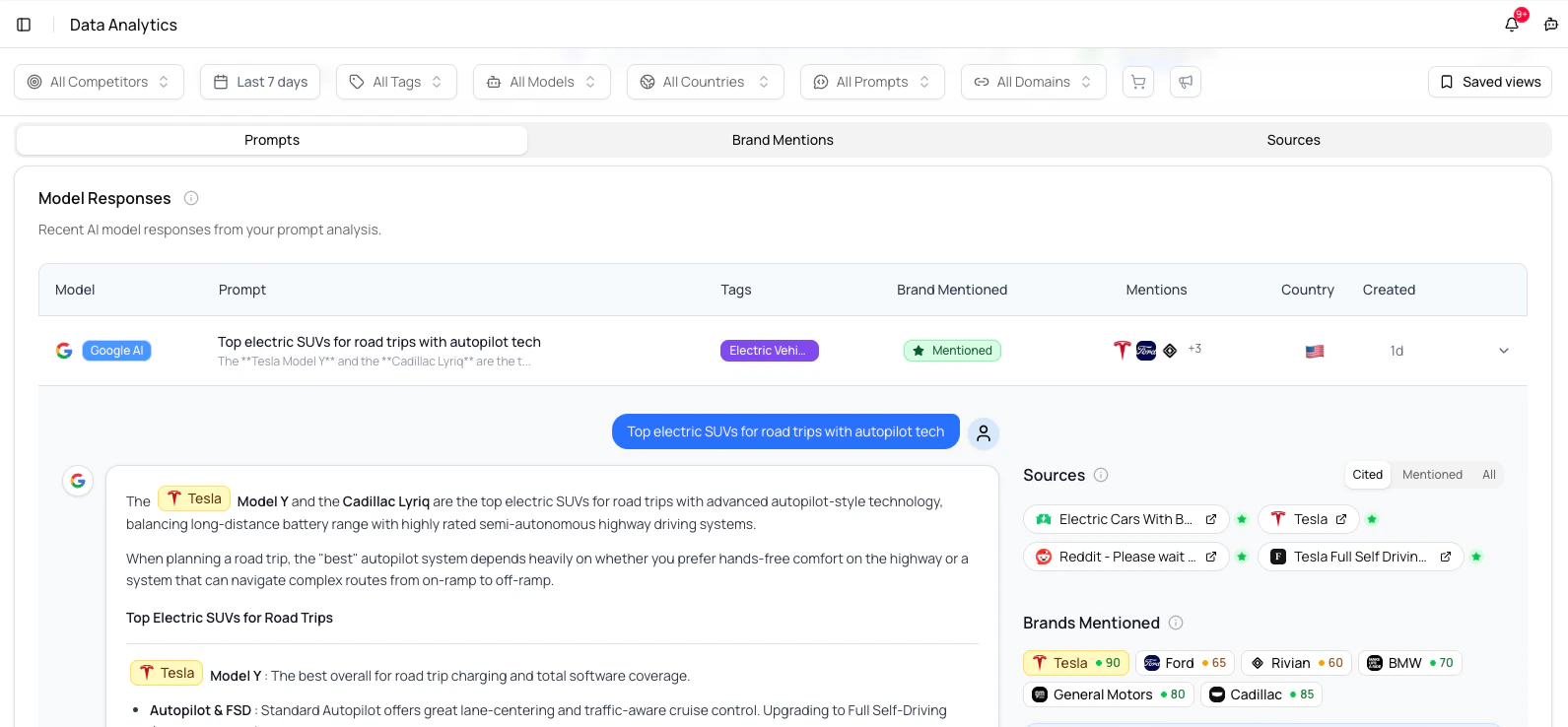 Drill down into individual prompt performance:
1. Click on any prompt in the list
2. View the response history for that prompt
3. See which runs included your brand mention
4. Track how responses have changed over time
### Identifying Patterns
Look for patterns in your prompt analytics:
* **Consistently mentioned**: These prompts represent your strengths
* **Never mentioned**: High-priority opportunities for improvement
* **Inconsistent**: Your visibility is unstable for these topics
## Competitor Analytics
Drill down into individual prompt performance:
1. Click on any prompt in the list
2. View the response history for that prompt
3. See which runs included your brand mention
4. Track how responses have changed over time
### Identifying Patterns
Look for patterns in your prompt analytics:
* **Consistently mentioned**: These prompts represent your strengths
* **Never mentioned**: High-priority opportunities for improvement
* **Inconsistent**: Your visibility is unstable for these topics
## Competitor Analytics
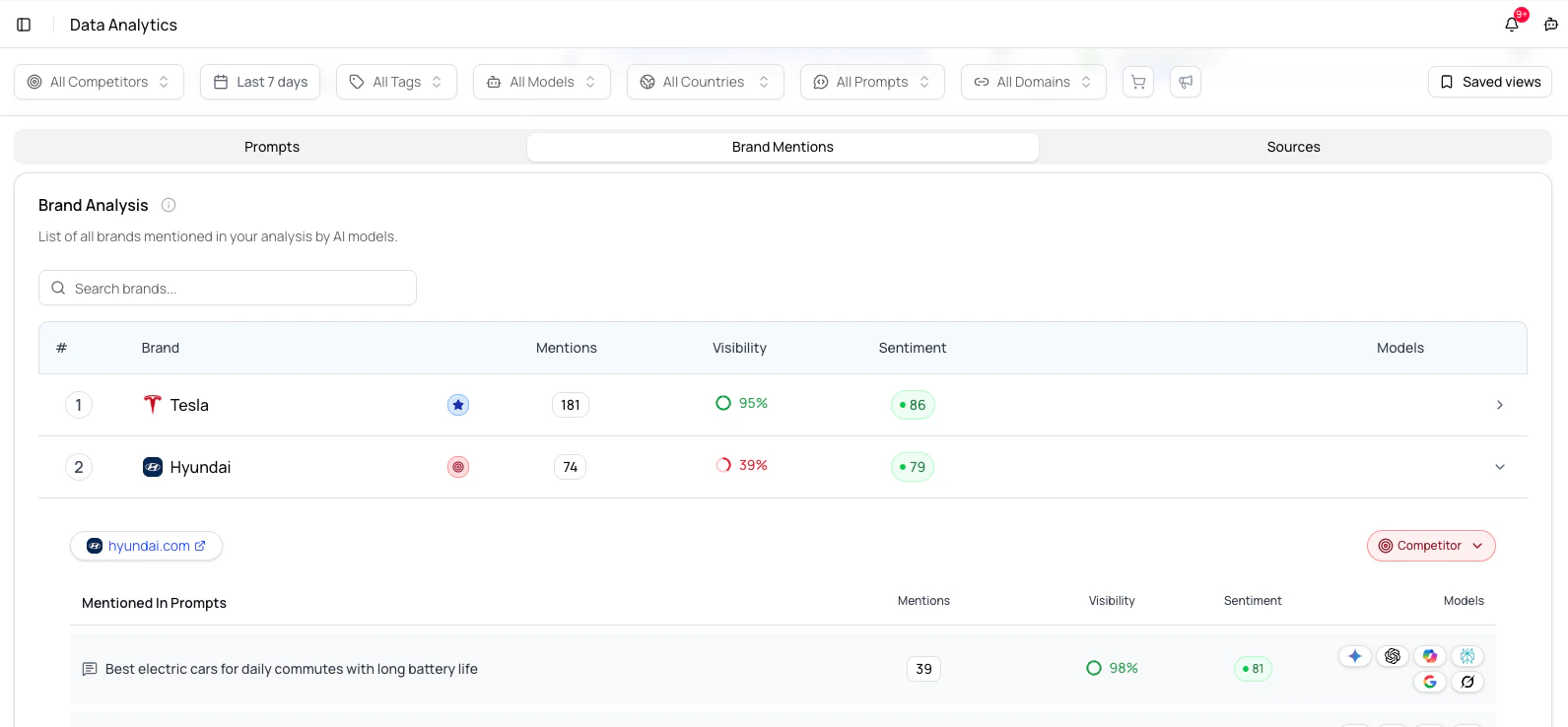 The competitor section compares your visibility against tracked competitors:
### Head-to-Head Comparison
See direct comparisons showing:
* Which brand is mentioned more often
* Sentiment differences between brands
* Trends over time
### Competitive Gaps
Identify prompts where:
* Competitors are mentioned but you aren't
* You have an opportunity to gain visibility
* You're already winning against competitors
## Source Analysis
The competitor section compares your visibility against tracked competitors:
### Head-to-Head Comparison
See direct comparisons showing:
* Which brand is mentioned more often
* Sentiment differences between brands
* Trends over time
### Competitive Gaps
Identify prompts where:
* Competitors are mentioned but you aren't
* You have an opportunity to gain visibility
* You're already winning against competitors
## Source Analysis
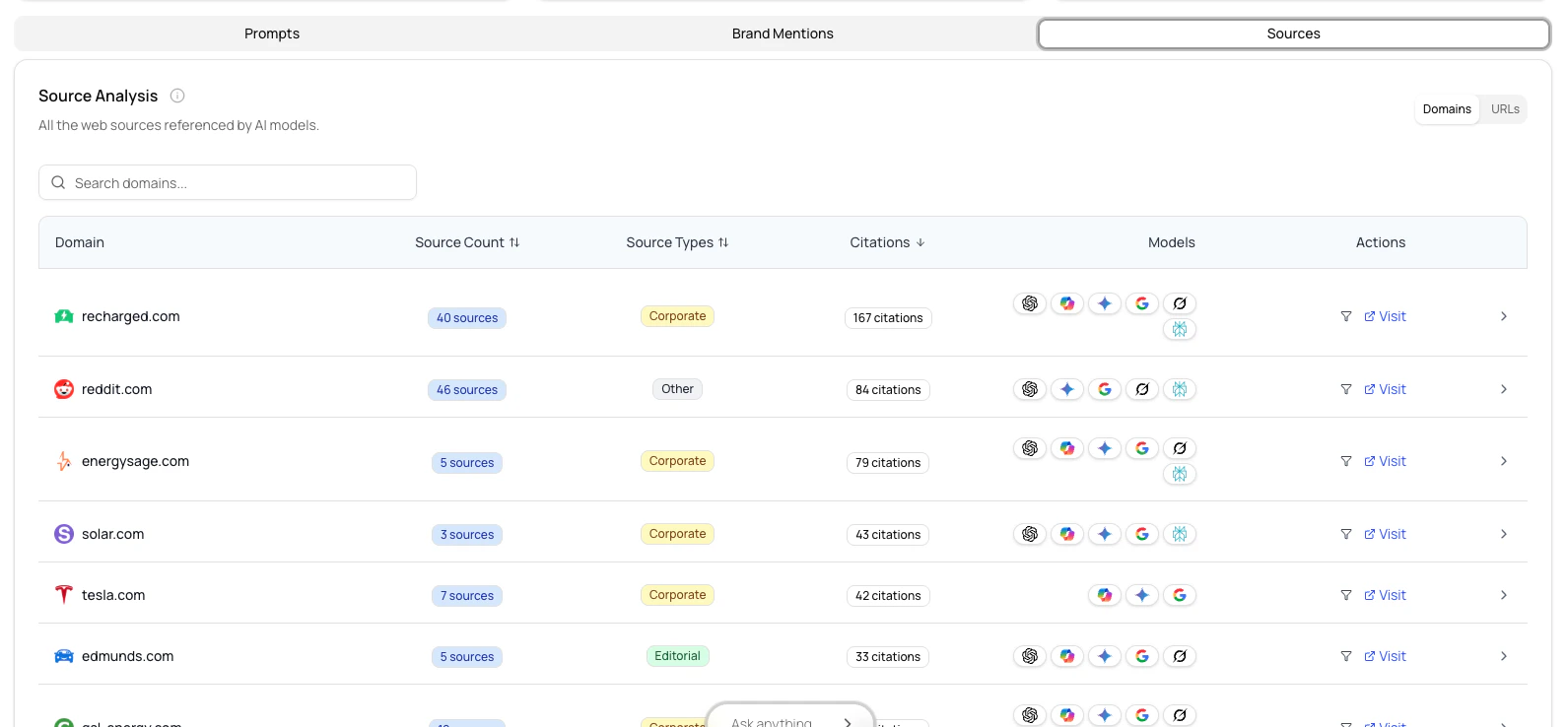 When AI engines cite sources, ChatFeatured tracks them:
* **Your sources**: How often your website or content is cited
* **Competitor sources**: Which competitor content is being referenced
* **Third-party sources**: Publications, reviews, or other references
This helps you understand what content AI models consider authoritative.
## Using Analytics Effectively
### Weekly Reviews
Set a recurring time to review your analytics:
1. Check overall mention rate trend
2. Review any significant changes
3. Identify new opportunities
4. Note any concerning patterns
### Monthly Deep Dives
Once a month, do a more thorough analysis:
1. Compare month-over-month performance
2. Analyze individual prompt performance
3. Review competitor positioning
4. Update your prompt strategy based on insights
### Correlating with Actions
Track how your optimizations affect visibility:
1. Note when you make changes (new content, website updates)
2. Watch for visibility changes in subsequent days/weeks
3. Correlate improvements with specific actions
## Interpreting Results
### What Good Looks Like
* Mention rate trending upward or stable
* Positive sentiment when your brand is mentioned
* Visibility across multiple AI engines
* Consistent performance over time
### Warning Signs
* Declining mention rate
* Competitors gaining visibility faster
* Inconsistent mentions (appearing/disappearing)
* Strong in one engine but weak in others
### Taking Action
When analytics reveal issues:
1. Review specific prompts with low performance
2. Analyze what competitors are doing differently
3. Use the [AEO Agent](/ai-agents/aeo-agent) for recommendations
4. Implement changes and monitor results
When AI engines cite sources, ChatFeatured tracks them:
* **Your sources**: How often your website or content is cited
* **Competitor sources**: Which competitor content is being referenced
* **Third-party sources**: Publications, reviews, or other references
This helps you understand what content AI models consider authoritative.
## Using Analytics Effectively
### Weekly Reviews
Set a recurring time to review your analytics:
1. Check overall mention rate trend
2. Review any significant changes
3. Identify new opportunities
4. Note any concerning patterns
### Monthly Deep Dives
Once a month, do a more thorough analysis:
1. Compare month-over-month performance
2. Analyze individual prompt performance
3. Review competitor positioning
4. Update your prompt strategy based on insights
### Correlating with Actions
Track how your optimizations affect visibility:
1. Note when you make changes (new content, website updates)
2. Watch for visibility changes in subsequent days/weeks
3. Correlate improvements with specific actions
## Interpreting Results
### What Good Looks Like
* Mention rate trending upward or stable
* Positive sentiment when your brand is mentioned
* Visibility across multiple AI engines
* Consistent performance over time
### Warning Signs
* Declining mention rate
* Competitors gaining visibility faster
* Inconsistent mentions (appearing/disappearing)
* Strong in one engine but weak in others
### Taking Action
When analytics reveal issues:
1. Review specific prompts with low performance
2. Analyze what competitors are doing differently
3. Use the [AEO Agent](/ai-agents/aeo-agent) for recommendations
4. Implement changes and monitor results