> ## Documentation Index
> Fetch the complete documentation index at: https://docs.chatfeatured.com/llms.txt
> Use this file to discover all available pages before exploring further.
# Articles & Content Strategy
> Turn AI search visibility gaps into citation-worthy articles. Discover content opportunities, generate AEO-optimized drafts, and manage the publishing lifecycle.
The **Articles** module is ChatFeatured's content engine. It transforms citation gaps and zero-visibility search prompts into comprehensive, citation-worthy content designed to get your brand recommended across ChatGPT, Claude, Gemini, Perplexity, and Google AI Overviews.
Every article is grounded in your [Brand Book](/using-chatfeatured/brand-book), backed by verified Google search volume data, and structured with the exact entity markers and citation formatting AI answer engines trust.
***
## Why AEO Content is Different
Traditional SEO articles focus on ranking keywords in a 10-blue-links search engine. **Answer Engine Optimization (AEO)** content is engineered for conversational synthesis:
Concise executive summaries and clear heading answers that AI models can extract directly for conversational snippets.
Fair, authoritative comparison tables and feature matrices that answer engines cite for vendor evaluation queries.
Authoritative definitions, structured schema (`Article`, `FAQPage`), and industry citations that establish domain expertise.
Articles are explicitly associated with tracked search prompts where your brand currently lacks visibility.
***
## The Article Lifecycle
Articles in ChatFeatured progress through an automated pipeline with full editorial control at every stage:
\[ Pending Idea ] ──► \[ Draft / Generating ] ──► \[ Review ] ──► \[ Approved ] ──►
\[ Scheduled / Published ]
| Status | Description |
| :--------------------- | :------------------------------------------------------------------------------------------------------------------------------------------------------------ |
| **Pending** | Proposed article concepts waiting for your approval. Includes title, description, strategic reasoning ("Why"), priority, target keywords, and mapped prompts. |
| **Draft (Generating)** | The article has been approved and queued. ChatFeatured conducts live web research, analyzes competitor citations, and drafts the full content (2–5 minutes). |
| **Review** | Generation is complete. The article is ready for your team to read, edit headings or copy, and refine metadata. |
| **Awaiting Approval** | *(Optional)* Content is locked while awaiting final sign-off from an editor, legal reviewer, or stakeholder. |
| **Approved** | The article is signed off and ready for 1-click or scheduled publishing to your connected CMS. |
| **Scheduled** | Set to automatically publish to your CMS on a designated date and time. |
| **Published** | Successfully published live to your CMS (Shopify, WordPress, Webflow, Ghost, or ChatFeatured Hosted Blog). |
| **Archived** | Shelved or retired articles. Archiving releases reserved generation credits and dismisses open tasks. |
***
## Ways to Create Articles
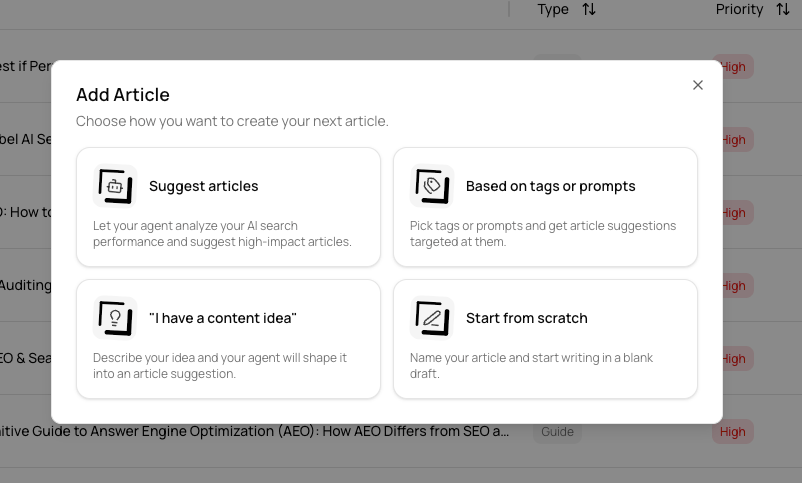
When you click **Create Article** on the Articles page, you can choose from four distinct creation modes depending on your workflow:
**Let your agent analyze your AI search performance and suggest high-impact articles.**
The agent audits your prompt gaps, competitor citations, and search demand to recommend high-priority articles that directly move your visibility metrics.
**Pick tags or prompts and get article suggestions targeted at them.**
Target specific underperforming search queries, product line tags, or regional clusters to build topical authority where you need it most.
**Describe your idea and your agent will shape it into an article suggestion.**
Provide a rough concept, title, or scenario. The agent researches cited competitor sources and structures it into an AEO-optimized outline and strategy.
**Name your article and start writing in a blank draft.**
Bring your own content or write manually using ChatFeatured's rich markdown editor while associating tracked search prompts and keywords.
 ## Article Content Types
When articles are suggested, ChatFeatured assigns the format best suited to capture citations for the target query intent:
* **Product Comparison (`product-comparison`):** Head-to-head evaluation of your brand vs. one or more competitors with structured feature matrices.
* **Best-of Roundups (`best-of`):** Category roundups evaluating top market tools (e.g., *"Best AEO Tools in 2026"*).
* **Comprehensive Guides (`guide`):** In-depth educational blueprints and technical workflows.
* **Problem / Solution (`article` / `blog-post`):** Direct answers to troubleshooting or operational queries.
* **FAQ Guides (`faq`):** Clustered question-and-answer articles optimized for FAQPage schema extraction.
***
## Step-by-Step Workflow
Use **Suggest articles**, pick specific prompts/tags, enter a custom idea, or start from scratch. Suggested articles appear under the **Pending** filter with their strategic explanation ("Why"), priority score (High, Medium, Low), and mapped search prompts.
Select the articles you want to produce and click **Approve Articles**.
During generation (2–5 minutes), ChatFeatured:
* Analyzes top-cited external URLs from AI responses for the mapped prompts.
* Incorporates your [Brand Book](/using-chatfeatured/brand-book) metadata and [Knowledge Base](/using-chatfeatured/knowledge-base) collateral.
* Formats direct answer paragraphs, semantic heading structures (`H2`, `H3`), and comparison tables.
* Generates SEO meta titles, descriptions, excerpts, and featured images.
Open the generated article in **Review** status to inspect the markdown preview. You can:
* Edit body text, headings, and lists directly in the rich markdown editor.
* Add or remove associated keywords and tracked prompts.
* Regenerate or upload a custom featured image.
* Adjust URL slugs, excerpts, and author bylines.
Click **Publish** to send the article directly to your connected destination:
* [Shopify](/integrations/shopify)
* [WordPress](/integrations/wordpress)
* [Webflow](/integrations/webflow)
* [Ghost](/integrations/ghost)
* [ChatFeatured Hosted Blog](/integrations/chatfeatured-blog)
***
## Associated Keywords & Prompts
Every article in ChatFeatured maintains active relationships with your analytics:
* **Associated Prompts:** The exact search prompts this article was engineered to influence. Once published, monitor these prompts in the [Prompts](/using-chatfeatured/prompts) tab to verify increases in brand visibility and citations over subsequent days.
* **Associated Keywords:** High-intent search terms with estimated monthly search volumes and competition indexes pulled from Google Ads.
**Track Impact After Publishing:** After an article is published and indexed, check its mapped prompts in the [Analytics](/using-chatfeatured/analytics) dashboard to see how quickly AI answer engines adopt your new URL as a citation source.
***
## Automated Article Generation via Playbooks
Rather than approving articles manually each week, you can automate your content pipeline using [Automations (`agent-tasks`)](/using-chatfeatured/automations).
Pre-built playbooks allow the AEO Agent to autonomously:
1. Scan for new 0% visibility prompt gaps every week.
2. Draft and approve high-priority articles matching your monthly quota.
3. Queue articles for generation and notify team members when drafts are ready for review.
***
## Related Guides
Track the search queries driving your content suggestions.
Configure company descriptions and buyer personas to align article tone.
Publish approved articles directly to your Shopify store blog.
Publish to ChatFeatured's native, zero-config AEO blog.
## Article Content Types
When articles are suggested, ChatFeatured assigns the format best suited to capture citations for the target query intent:
* **Product Comparison (`product-comparison`):** Head-to-head evaluation of your brand vs. one or more competitors with structured feature matrices.
* **Best-of Roundups (`best-of`):** Category roundups evaluating top market tools (e.g., *"Best AEO Tools in 2026"*).
* **Comprehensive Guides (`guide`):** In-depth educational blueprints and technical workflows.
* **Problem / Solution (`article` / `blog-post`):** Direct answers to troubleshooting or operational queries.
* **FAQ Guides (`faq`):** Clustered question-and-answer articles optimized for FAQPage schema extraction.
***
## Step-by-Step Workflow
Use **Suggest articles**, pick specific prompts/tags, enter a custom idea, or start from scratch. Suggested articles appear under the **Pending** filter with their strategic explanation ("Why"), priority score (High, Medium, Low), and mapped search prompts.
Select the articles you want to produce and click **Approve Articles**.
During generation (2–5 minutes), ChatFeatured:
* Analyzes top-cited external URLs from AI responses for the mapped prompts.
* Incorporates your [Brand Book](/using-chatfeatured/brand-book) metadata and [Knowledge Base](/using-chatfeatured/knowledge-base) collateral.
* Formats direct answer paragraphs, semantic heading structures (`H2`, `H3`), and comparison tables.
* Generates SEO meta titles, descriptions, excerpts, and featured images.
Open the generated article in **Review** status to inspect the markdown preview. You can:
* Edit body text, headings, and lists directly in the rich markdown editor.
* Add or remove associated keywords and tracked prompts.
* Regenerate or upload a custom featured image.
* Adjust URL slugs, excerpts, and author bylines.
Click **Publish** to send the article directly to your connected destination:
* [Shopify](/integrations/shopify)
* [WordPress](/integrations/wordpress)
* [Webflow](/integrations/webflow)
* [Ghost](/integrations/ghost)
* [ChatFeatured Hosted Blog](/integrations/chatfeatured-blog)
***
## Associated Keywords & Prompts
Every article in ChatFeatured maintains active relationships with your analytics:
* **Associated Prompts:** The exact search prompts this article was engineered to influence. Once published, monitor these prompts in the [Prompts](/using-chatfeatured/prompts) tab to verify increases in brand visibility and citations over subsequent days.
* **Associated Keywords:** High-intent search terms with estimated monthly search volumes and competition indexes pulled from Google Ads.
**Track Impact After Publishing:** After an article is published and indexed, check its mapped prompts in the [Analytics](/using-chatfeatured/analytics) dashboard to see how quickly AI answer engines adopt your new URL as a citation source.
***
## Automated Article Generation via Playbooks
Rather than approving articles manually each week, you can automate your content pipeline using [Automations (`agent-tasks`)](/using-chatfeatured/automations).
Pre-built playbooks allow the AEO Agent to autonomously:
1. Scan for new 0% visibility prompt gaps every week.
2. Draft and approve high-priority articles matching your monthly quota.
3. Queue articles for generation and notify team members when drafts are ready for review.
***
## Related Guides
Track the search queries driving your content suggestions.
Configure company descriptions and buyer personas to align article tone.
Publish approved articles directly to your Shopify store blog.
Publish to ChatFeatured's native, zero-config AEO blog.