> ## Documentation Index
> Fetch the complete documentation index at: https://docs.chatfeatured.com/llms.txt
> Use this file to discover all available pages before exploring further.
# Agent Automations
> Configure autonomous background workflows for daily content research, weekly visibility reporting, and competitor citation monitoring.
**Automations** enable your Unified AEO Agent to work autonomously in the background on recurring schedules. Instead of manually running analytics queries, auditing competitor movements, or researching content gaps every week, you can configure autonomous workflows that execute on a scheduled cadence and deliver actionable results directly to your team.
Set custom recurring schedules (daily, weekly, or specific days) for continuous optimization.
Receive structured performance summaries, newly discovered gaps, and execution logs in your inbox.
***
## How Automations Work
Automations run completely in the cloud without requiring an open browser tab or manual intervention.
At the scheduled time, the ChatFeatured Automations worker instantiates a dedicated agent session scoped to your brand workspace.
The agent checks its **3-Tiered Persistent Memory** and historical execution logs. It verifies what topics were previously generated, what tasks are currently open, and which editorial rules apply to prevent duplicate work.
The agent executes the required workflow across platform modes:
* Queries the latest AI model runs (ChatGPT, Claude, Gemini, Perplexity, Grok, Copilot, Google AI).
* Identifies net-new citation sources and visibility drops.
* Pulls search demand from Google Ads API.
* Drafts articles, audits site health, or flags PR outreach targets.
Results are logged to the **Automations Run History**, surfaced to your **Opportunities Panel** or **Tasks Board**, and compiled into an executive email report sent to configured team members.
***
## Pre-Built Automation Playbooks
ChatFeatured provides five core automation templates designed for Answer Engine Optimization:
**Cadence:** Weekly (e.g., Mondays at 8:00 AM)
**Objective:** Provide stakeholders with a comprehensive executive brief on visibility trends, share-of-voice shifts, and model-level movements.
* **What the Agent Does:**
1. Calculates Week-over-Week (WoW) visibility, sentiment, and share-of-voice deltas across all 7 tracked AI engines.
2. Highlights top-gaining and top-losing prompts and citation sources.
3. Identifies competitor movement and shifts in engine preference (ChatGPT, Claude, Gemini, Perplexity, etc.).
4. Delivers an executive email digest with key performance callouts and chart links.
**Cadence:** Weekly (e.g., Wednesdays at 9:00 AM)
**Objective:** Track competitor visibility gains, newly cited third-party publications, and market share changes.
* **What the Agent Does:**
1. Benchmarks your visibility and share of voice against all tracked competitor groups.
2. Detects new third-party domains, editorial URLs, and forum discussions where competitors are being cited.
3. Identifies emerging prompt topics where competitors are winning AI recommendations.
4. Surfaces actionable PR outreach, Earned Media, and UGC engagement opportunities to your Opportunities panel.
**Cadence:** Weekly (e.g., Fridays at 10:00 AM)
**Objective:** Continuously monitor technical site health, crawler accessibility, structured schema, and AI bot log telemetry.
* **What the Agent Does:**
1. Audits core site pages for technical AEO factors, content structure, schema markup, and `llms.txt` validity.
2. Inspects edge crawler log telemetry (Cloudflare, Vercel, AWS) to detect bot crawl anomalies, 4xx/5xx errors, or blocked user agents (GPTBot, ClaudeBot, PerplexityBot).
3. Automatically creates prioritized remediation tasks on your Task board with concrete code and metadata fixes.
**Cadence:** Monthly (e.g., 1st of the month at 9:00 AM)
**Objective:** Deliver a holistic retrospective on published content performance, indexation, and citation ROI over the preceding 30 days.
* **What the Agent Does:**
1. Analyzes all articles published or updated over the past 30 days across connected CMS platforms.
2. Measures post-publishing visibility and citation changes for associated prompt clusters.
3. Synthesizes search demand trends (Google Ads API) and identifies which content formats drove the highest AI citation impact.
4. Sends a comprehensive monthly performance digest to executive stakeholders.
**Cadence:** Monthly (e.g., 1st or 15th of the month)
**Objective:** Automatically identify high-value search volume gaps, research, draft, and queue a batch of AEO-optimized articles.
* **What the Agent Does:**
1. Scans tracked prompts where your brand visibility is 0% or lagging, but search volume and competitor citations are high.
2. Pulls target keyword phrases and monthly search volumes via Google Ads API.
3. Autonomously conducts web research and writes complete, GEO-optimized articles tailored to LLM citation structures.
4. Queues drafts in your Content pipeline (`Draft` / `Review` status) respecting your monthly plan allowances.
***
## Creating & Managing Automations
You can set up automations either visually via the dashboard UI or conversationally through the AI Agent.
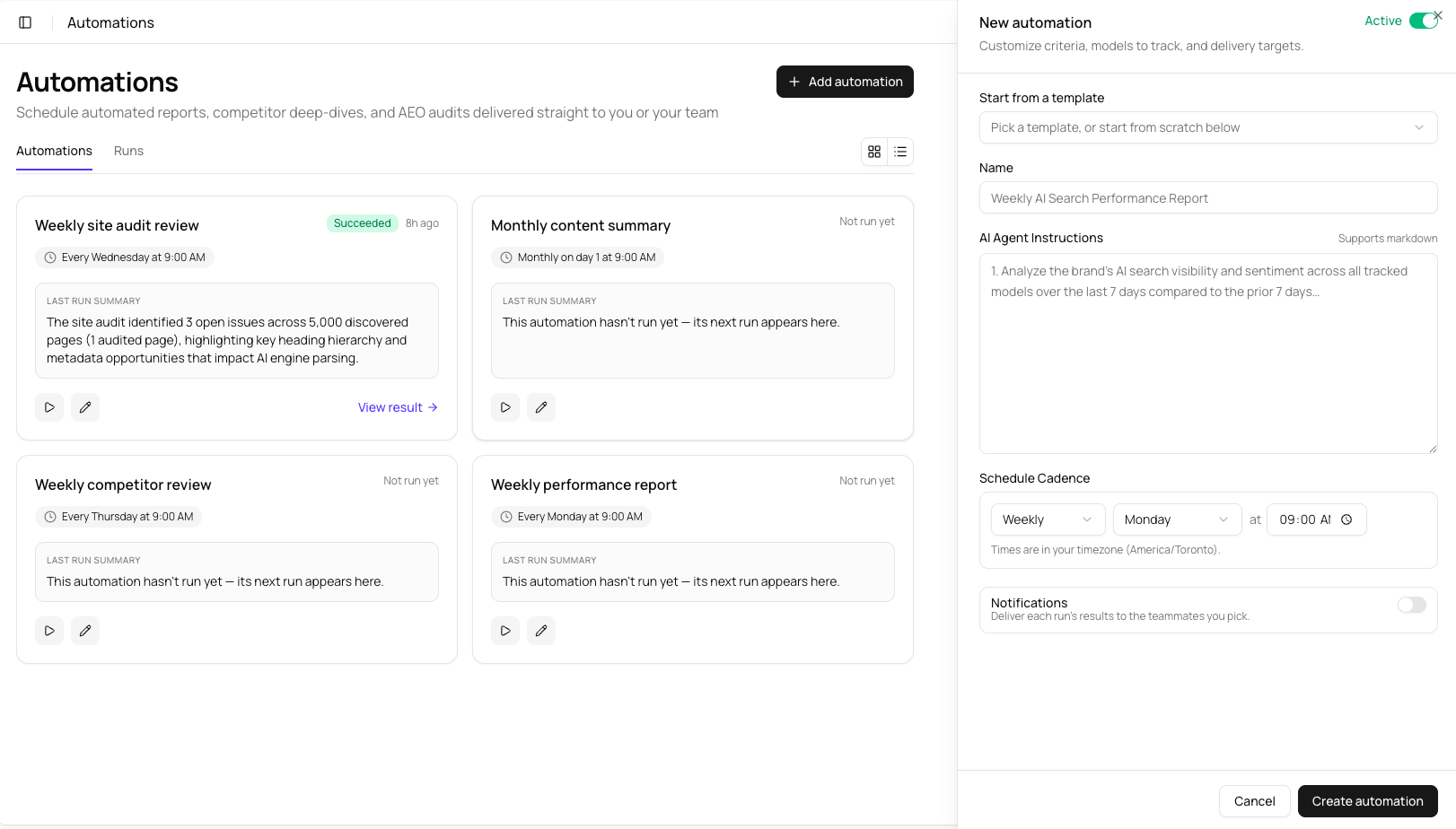
### Option A: Via the Automations Dashboard
1. Navigate to **Automations** (`/agent-tasks`) in the main navigation.
2. Click **+ New Automation**.
3. Choose a template playbook or select **Custom Automation**.
4. Configure the parameters:
* **Task Name:** A descriptive title (e.g., *"Daily AEO Article Discovery"*).
* **Schedule:** Choose frequency (Daily, Weekly, Monthly) and execution time/time zone.
* **Scope & Instructions:** Provide custom instructions or prompt focus areas.
* **Notification Recipients:** Select which team members receive run summaries via email.
5. Click **Create Automation**.
 ### Option B: Conversationally via the AI Agent
You can create or modify automations directly in chat by switching to `tasks` mode:
*"Set up an automation to analyze our competitor citations every Friday at 4 PM and email the report to [team@company.com](mailto:team@company.com)."*
*"What scheduled automations are currently active for this brand workspace?"*
*"Run the 'Weekly AI Visibility Report' automation right now so I can see current numbers."*
*"Pause the daily content drafting automation until next Monday."*
## Inspecting Run Logs
Every automated run produces an auditable execution trace. To inspect what an automation did:
1. Go to **Automations** (`/agent-tasks`).
2. Click on any automation to open its **Run History**.
3. Select an execution timestamp to view:
* **Runtime Summary:** Duration, tokens consumed, and status (`Success`, `Completed with Warnings`, `Failed`).
* **Agent Reasoning Trace:** The step-by-step logic the agent used to query analytics, evaluate competitors, and formulate actions.
* **Output Artifacts:** Direct links to drafted articles, surfaced opportunities, or generated tasks.
***
## Frequently Asked Questions
**Tasks (`/tasks`)** are one-time execution items (like a to-do list item: *"Write article on AEO tools"*). **Automations (`/agent-tasks`)** are the recurring scheduled jobs that autonomously run in the background (like *"Run content discovery every morning at 6 AM"*).
ChatFeatured includes built-in exponential backoff and retry logic. If a data source (e.g., an external AI model) is temporarily unreachable, the automation will re-attempt execution up to 3 times before logging an error notification.
Yes. Automations automatically inherit the **Brand Book**, **Personas**, and **Agent Writing Guidelines** configured in your Brand settings and persistent memory.
Open the specific automation in `/agent-tasks`, click **Edit Settings**, and update the **Email Recipients** list.
### Option B: Conversationally via the AI Agent
You can create or modify automations directly in chat by switching to `tasks` mode:
*"Set up an automation to analyze our competitor citations every Friday at 4 PM and email the report to [team@company.com](mailto:team@company.com)."*
*"What scheduled automations are currently active for this brand workspace?"*
*"Run the 'Weekly AI Visibility Report' automation right now so I can see current numbers."*
*"Pause the daily content drafting automation until next Monday."*
## Inspecting Run Logs
Every automated run produces an auditable execution trace. To inspect what an automation did:
1. Go to **Automations** (`/agent-tasks`).
2. Click on any automation to open its **Run History**.
3. Select an execution timestamp to view:
* **Runtime Summary:** Duration, tokens consumed, and status (`Success`, `Completed with Warnings`, `Failed`).
* **Agent Reasoning Trace:** The step-by-step logic the agent used to query analytics, evaluate competitors, and formulate actions.
* **Output Artifacts:** Direct links to drafted articles, surfaced opportunities, or generated tasks.
***
## Frequently Asked Questions
**Tasks (`/tasks`)** are one-time execution items (like a to-do list item: *"Write article on AEO tools"*). **Automations (`/agent-tasks`)** are the recurring scheduled jobs that autonomously run in the background (like *"Run content discovery every morning at 6 AM"*).
ChatFeatured includes built-in exponential backoff and retry logic. If a data source (e.g., an external AI model) is temporarily unreachable, the automation will re-attempt execution up to 3 times before logging an error notification.
Yes. Automations automatically inherit the **Brand Book**, **Personas**, and **Agent Writing Guidelines** configured in your Brand settings and persistent memory.
Open the specific automation in `/agent-tasks`, click **Edit Settings**, and update the **Email Recipients** list.