> ## Documentation Index
> Fetch the complete documentation index at: https://docs.chatfeatured.com/llms.txt
> Use this file to discover all available pages before exploring further.
# Site Audit
> Analyze your website for technical, content, and AEO optimization opportunities
Site Audit analyzes your website to identify opportunities for improving your AI visibility. It runs comprehensive checks at both the site level and individual page level, scoring your site across three dimensions: Technical, Content, and AEO.
## Understanding Your Scores
Every audit generates three scores that measure different aspects of your site's AI readiness:
**0-100%**
SEO fundamentals and technical health. Measures crawlability, security, and site foundation.
**Target: 95%+**
**0-100%**
Content quality and structure. Measures how well your content is organized and detailed.
**Target: 90%+**
**0-100%**
Answer Engine Optimization readiness. Measures how likely AI engines will cite your content.
**Target: 85%+**
## Score Categories
Every audit generates scores across three categories:
SEO fundamentals and technical health—page status, redirects, broken links, HTTPS, and more.
Content quality and metadata—titles, descriptions, canonical tags, Open Graph tags, and content depth.
Answer Engine Optimization—structured data, content structure, answer formatting, and citation authority.
## Site-Level Checks
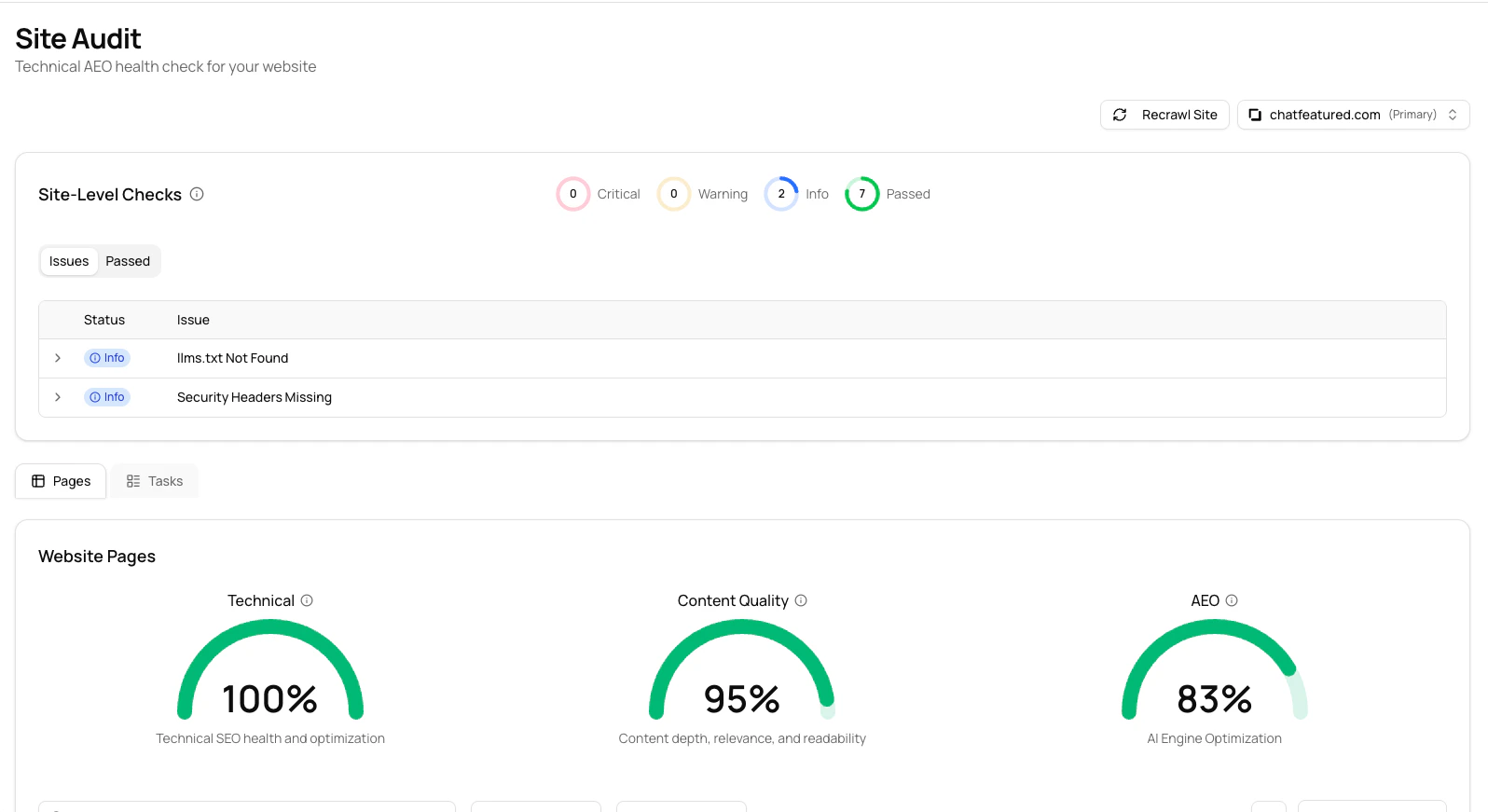 Site-level checks analyze domain-wide configuration that affects your entire website. These checks run once per audit and include:
### Technical Checks
| Check | Description |
| ---------------------- | ------------------------------------------------------ |
| robots.txt Accessible | Verifies your robots.txt file exists and is accessible |
| Sitemap Accessible | Checks if your XML sitemap is available |
| Sitemap Valid | Validates your sitemap XML format |
| Sitemap in robots.txt | Confirms sitemap URL is referenced in robots.txt |
| HTTPS Certificate | Verifies SSL/TLS certificate validity and expiration |
| HTTP to HTTPS Redirect | Checks that HTTP requests redirect to HTTPS |
| Security Headers | Reviews security headers (X-Frame-Options, CSP, HSTS) |
### AEO Checks
| Check | Description |
| ------------------- | ---------------------------------------------------------------------- |
| AI Crawlers Allowed | Verifies GPTBot, ClaudeBot, PerplexityBot aren't blocked in robots.txt |
| llms.txt Present | Checks for an llms.txt file for AI system guidance |
| llms.txt Valid | Validates llms.txt format (requires H1 heading) |
## Page-Level Checks
Site-level checks analyze domain-wide configuration that affects your entire website. These checks run once per audit and include:
### Technical Checks
| Check | Description |
| ---------------------- | ------------------------------------------------------ |
| robots.txt Accessible | Verifies your robots.txt file exists and is accessible |
| Sitemap Accessible | Checks if your XML sitemap is available |
| Sitemap Valid | Validates your sitemap XML format |
| Sitemap in robots.txt | Confirms sitemap URL is referenced in robots.txt |
| HTTPS Certificate | Verifies SSL/TLS certificate validity and expiration |
| HTTP to HTTPS Redirect | Checks that HTTP requests redirect to HTTPS |
| Security Headers | Reviews security headers (X-Frame-Options, CSP, HSTS) |
### AEO Checks
| Check | Description |
| ------------------- | ---------------------------------------------------------------------- |
| AI Crawlers Allowed | Verifies GPTBot, ClaudeBot, PerplexityBot aren't blocked in robots.txt |
| llms.txt Present | Checks for an llms.txt file for AI system guidance |
| llms.txt Valid | Validates llms.txt format (requires H1 heading) |
## Page-Level Checks
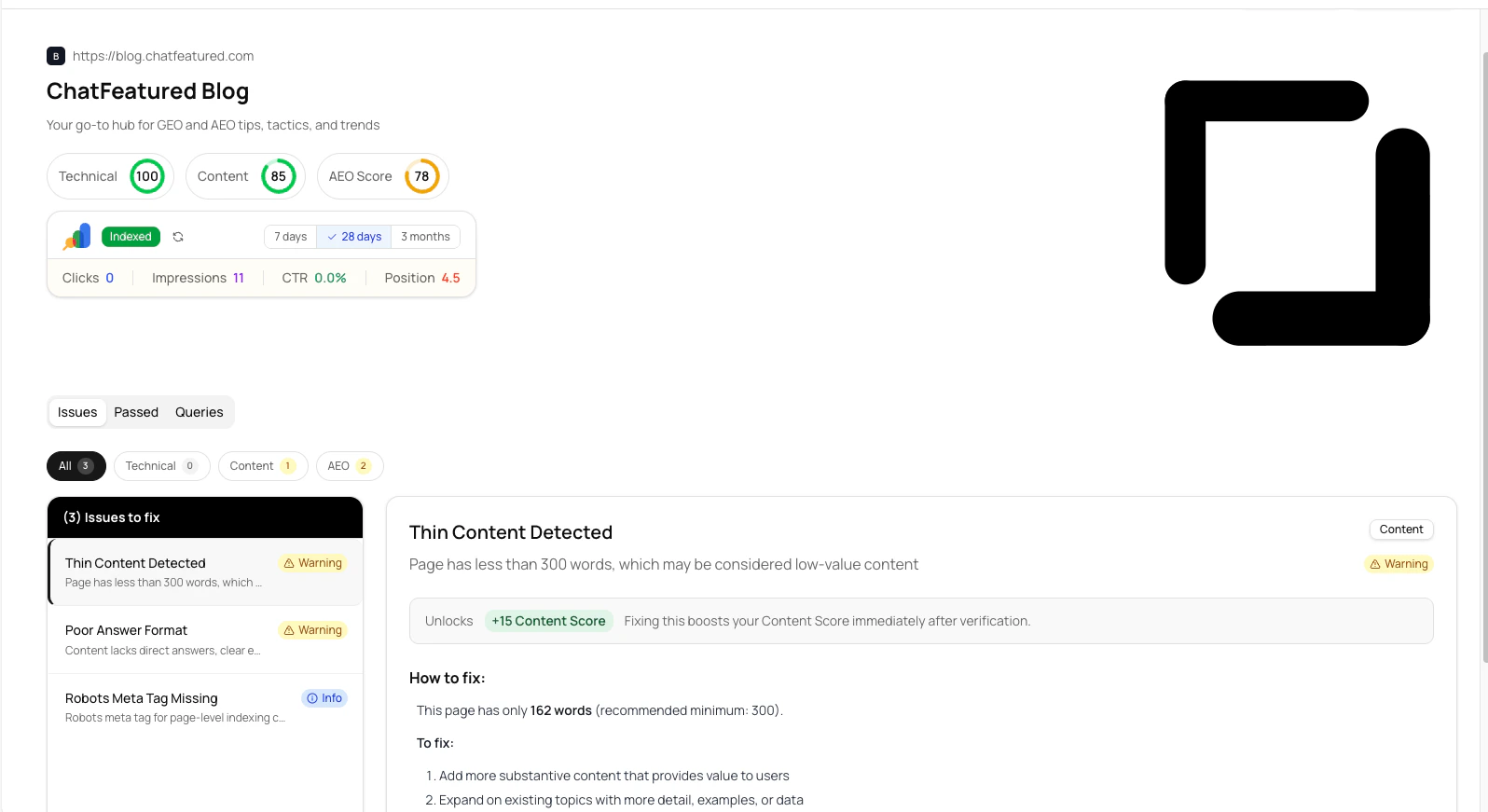 Page-level checks analyze individual pages on your site. Each page receives its own Technical, Content, and AEO scores based on these checks:
### Technical Checks
| Check | Description |
| --------------------- | ------------------------------------------------------- |
| Page Status 200 | Page returns successful HTTP status |
| Redirect Chain | Detects long redirect chains (3+ hops) |
| Broken Internal Links | Finds internal links that return errors |
| Blocked Resources | Identifies images, scripts, or styles that fail to load |
| Mixed Content | Detects insecure HTTP resources on HTTPS pages |
### Content Checks
| Check | Description |
| ---------------- | ---------------------------------------------- |
| Title Tag | Presence of HTML title tag |
| Meta Description | Presence of meta description tag |
| Canonical Tag | Canonical URL for duplicate content prevention |
| Open Graph Tags | OG tags for social sharing previews |
| Thin Content | Flags pages with less than 300 words |
### AEO Checks
| Check | Description |
| ----------------------- | --------------------------------------------------------- |
| Robots Meta Tag | Page-level indexing control |
| JSON-LD Structured Data | Schema.org markup for rich results |
| Content Structure | H1 presence, heading hierarchy, internal linking |
| Answer Format | Direct answers, clear explanations, definitions, examples |
| Citation Authority | Author info, sources, freshness, expertise signals |
## Running a Site Audit
### Starting Your First Audit
Click **Site Audit** in the main sidebar
Your brand's domain is automatically selected
Click the **Run Site Audit** button to start
Audit completes in 2-10 minutes depending on site size
Navigate to the Pages view to see all audited pages
The audit discovers pages from your sitemap and internal links, then runs all checks on each page.
### Viewing Results
Page-level checks analyze individual pages on your site. Each page receives its own Technical, Content, and AEO scores based on these checks:
### Technical Checks
| Check | Description |
| --------------------- | ------------------------------------------------------- |
| Page Status 200 | Page returns successful HTTP status |
| Redirect Chain | Detects long redirect chains (3+ hops) |
| Broken Internal Links | Finds internal links that return errors |
| Blocked Resources | Identifies images, scripts, or styles that fail to load |
| Mixed Content | Detects insecure HTTP resources on HTTPS pages |
### Content Checks
| Check | Description |
| ---------------- | ---------------------------------------------- |
| Title Tag | Presence of HTML title tag |
| Meta Description | Presence of meta description tag |
| Canonical Tag | Canonical URL for duplicate content prevention |
| Open Graph Tags | OG tags for social sharing previews |
| Thin Content | Flags pages with less than 300 words |
### AEO Checks
| Check | Description |
| ----------------------- | --------------------------------------------------------- |
| Robots Meta Tag | Page-level indexing control |
| JSON-LD Structured Data | Schema.org markup for rich results |
| Content Structure | H1 presence, heading hierarchy, internal linking |
| Answer Format | Direct answers, clear explanations, definitions, examples |
| Citation Authority | Author info, sources, freshness, expertise signals |
## Running a Site Audit
### Starting Your First Audit
Click **Site Audit** in the main sidebar
Your brand's domain is automatically selected
Click the **Run Site Audit** button to start
Audit completes in 2-10 minutes depending on site size
Navigate to the Pages view to see all audited pages
The audit discovers pages from your sitemap and internal links, then runs all checks on each page.
### Viewing Results
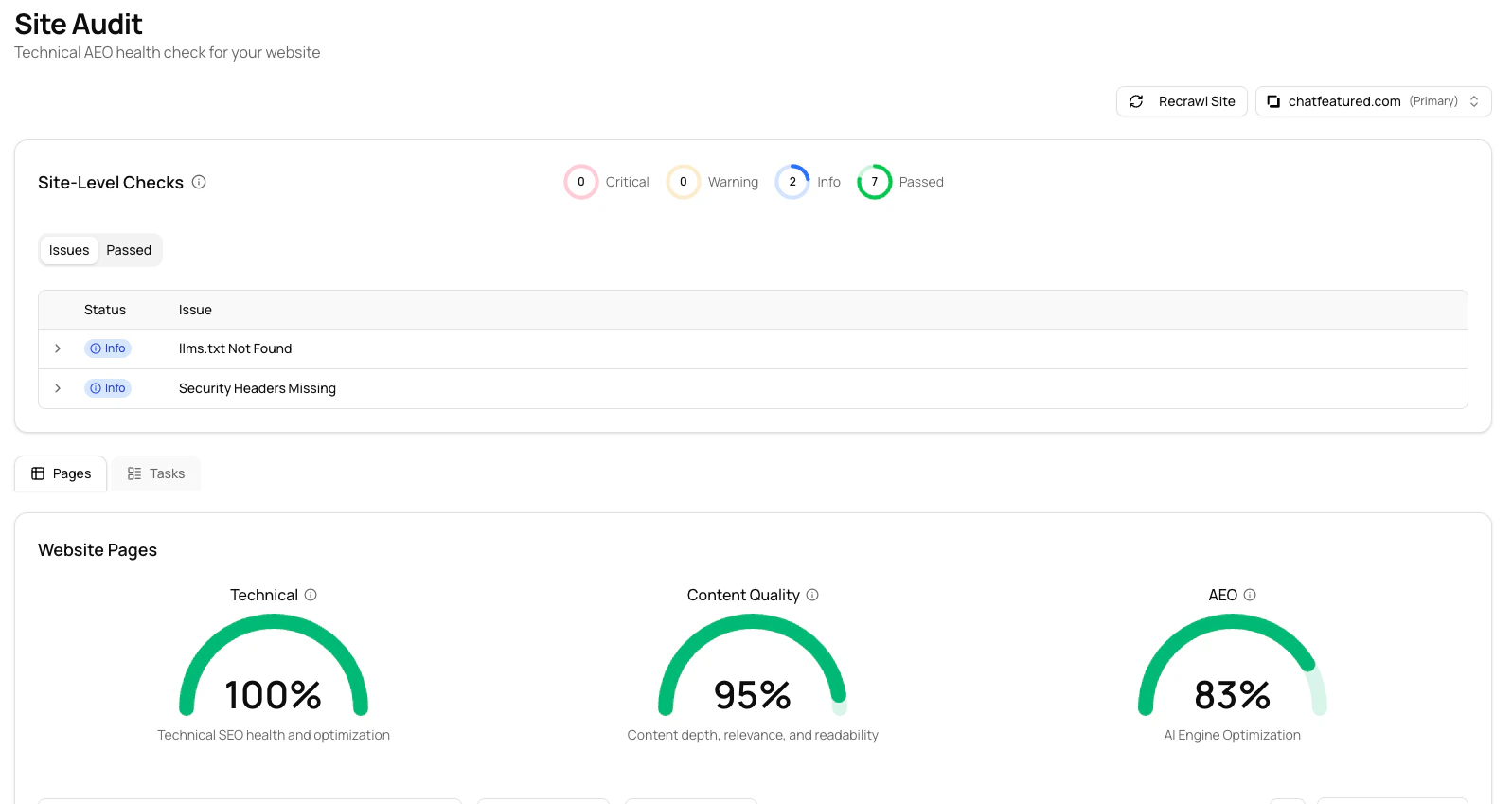 After the audit completes, you'll see:
* **Site-Level Checks** - Domain-wide issues at the top
* **Pages View** - Table of all audited pages with individual scores
* **Tasks View** - Aggregated list of issues across all pages
### Understanding Issue Severity
Issues are categorized by impact:
| Severity | Description | When to Fix |
| -------- | ------------------------------------------------- | ---------------- |
| Critical | Major issues that significantly impact visibility | Immediately |
| Warning | Important issues that should be addressed soon | Within 1-2 weeks |
| Info | Minor improvements to consider | When time allows |
| Pass | Check completed successfully | Monitor only |
Critical issues block crawling or significantly hurt your scores. Address these first.
## Common Issues You Might See
Understanding common issues helps you prioritize fixes. Here are issues you're most likely to encounter:
### Content Issues
**Thin Content Detected**
Page has less than 300 words.
* **Why it matters:** AI engines need substantive content to cite your work. Pages with very little text are less likely to be selected as sources.
* **How to fix:** Add more detail, expand with examples, or consolidate pages. Aim for 300+ words.
* **Score impact:** +15-20 Content Score
**Poor Content Structure**
Missing H1 tags or improper heading hierarchy.
* **Why it matters:** AI engines use headings to understand page topics and structure. Poor structure makes it harder to extract answers.
* **How to fix:** Add a single H1 at the top. Use H2/H3 tags in logical order. Don't skip levels.
* **Score impact:** +12-18 Content Score
**Poor Answer Format**
Content lacks direct answers, clear explanations, or definitions.
* **Why it matters:** AI engines look for direct answers to questions. Buried answers are less likely to be cited.
* **How to fix:** Start with a direct answer. Define key terms early. Use examples and lists. Be clear and specific.
* **Score impact:** +10-15 AEO Score
**Missing Meta Description**
Page doesn't have a meta description tag.
* **Why it matters:** Meta descriptions help AI engines understand context and are used in search previews.
* **How to fix:** Add a 150-160 character description of the page content. Include your keyword naturally.
* **Score impact:** +3-5 Content Score
### Technical Issues
**Broken Internal Links**
Your page links to other pages on your site that return 404 errors.
* **Why it matters:** Broken links degrade user experience and confuse AI crawlers about site structure.
* **How to fix:** Fix the destination (if page exists), update the URL, remove the link, or set up redirects.
* **Score impact:** +5-8 Technical Score
**HTTPS Certificate Issues**
Your SSL certificate is invalid, expired, or misconfigured.
* **Why it matters:** Expired certificates break secure connections. AI crawlers won't access insecure pages.
* **How to fix:** Renew your certificate immediately. Verify it's valid for your domain. Ensure HTTP redirects to HTTPS.
* **Score impact:** Critical—blocks crawling
SSL certificate issues are critical—AI crawlers cannot access your site without valid HTTPS.
**Security Headers Missing**
Your server doesn't send important security headers.
* **Why it matters:** Security headers protect your site and signal trustworthiness to crawlers.
* **How to fix:** Add X-Frame-Options, Content-Security-Policy, Strict-Transport-Security, and X-Content-Type-Options headers.
* **Score impact:** +1-2 Technical Score
### AEO Issues
**JSON-LD Structured Data Missing**
Page doesn't have schema.org markup in JSON-LD format.
* **Why it matters:** Structured data helps AI engines understand content type, author, and metadata. It increases citation chances.
* **How to fix:** Add Article schema for blog posts. Add FAQ schema for FAQs. Add HowTo for guides. Include author, date, image.
* **Score impact:** +15-20 AEO Score
```json Article Schema theme={null}
{
"@context": "https://schema.org",
"@type": "Article",
"headline": "How to Track Your AI Tool's Visibility",
"description": "A complete guide to tracking your brand in AI search engines",
"image": "https://example.com/image.jpg",
"author": {
"@type": "Person",
"name": "Your Name"
},
"datePublished": "2024-05-20"
}
```
```json FAQ Schema theme={null}
{
"@context": "https://schema.org",
"@type": "FAQPage",
"mainEntity": [
{
"@type": "Question",
"name": "What is AI Visibility?",
"acceptedAnswer": {
"@type": "Answer",
"text": "AI Visibility is how often your brand appears..."
}
}
]
}
```
**llms.txt Not Found**
You don't have an llms.txt file at your root domain.
* **Why it matters:** llms.txt tells AI crawlers which pages you want indexed and how to handle your content.
* **How to fix:** Create `llms.txt` at your domain root. Add an H1 heading as the first line. List your key pages.
* **Score impact:** +2-3 AEO Score
## Page Details
Click any page in the Pages table to see detailed analysis:
After the audit completes, you'll see:
* **Site-Level Checks** - Domain-wide issues at the top
* **Pages View** - Table of all audited pages with individual scores
* **Tasks View** - Aggregated list of issues across all pages
### Understanding Issue Severity
Issues are categorized by impact:
| Severity | Description | When to Fix |
| -------- | ------------------------------------------------- | ---------------- |
| Critical | Major issues that significantly impact visibility | Immediately |
| Warning | Important issues that should be addressed soon | Within 1-2 weeks |
| Info | Minor improvements to consider | When time allows |
| Pass | Check completed successfully | Monitor only |
Critical issues block crawling or significantly hurt your scores. Address these first.
## Common Issues You Might See
Understanding common issues helps you prioritize fixes. Here are issues you're most likely to encounter:
### Content Issues
**Thin Content Detected**
Page has less than 300 words.
* **Why it matters:** AI engines need substantive content to cite your work. Pages with very little text are less likely to be selected as sources.
* **How to fix:** Add more detail, expand with examples, or consolidate pages. Aim for 300+ words.
* **Score impact:** +15-20 Content Score
**Poor Content Structure**
Missing H1 tags or improper heading hierarchy.
* **Why it matters:** AI engines use headings to understand page topics and structure. Poor structure makes it harder to extract answers.
* **How to fix:** Add a single H1 at the top. Use H2/H3 tags in logical order. Don't skip levels.
* **Score impact:** +12-18 Content Score
**Poor Answer Format**
Content lacks direct answers, clear explanations, or definitions.
* **Why it matters:** AI engines look for direct answers to questions. Buried answers are less likely to be cited.
* **How to fix:** Start with a direct answer. Define key terms early. Use examples and lists. Be clear and specific.
* **Score impact:** +10-15 AEO Score
**Missing Meta Description**
Page doesn't have a meta description tag.
* **Why it matters:** Meta descriptions help AI engines understand context and are used in search previews.
* **How to fix:** Add a 150-160 character description of the page content. Include your keyword naturally.
* **Score impact:** +3-5 Content Score
### Technical Issues
**Broken Internal Links**
Your page links to other pages on your site that return 404 errors.
* **Why it matters:** Broken links degrade user experience and confuse AI crawlers about site structure.
* **How to fix:** Fix the destination (if page exists), update the URL, remove the link, or set up redirects.
* **Score impact:** +5-8 Technical Score
**HTTPS Certificate Issues**
Your SSL certificate is invalid, expired, or misconfigured.
* **Why it matters:** Expired certificates break secure connections. AI crawlers won't access insecure pages.
* **How to fix:** Renew your certificate immediately. Verify it's valid for your domain. Ensure HTTP redirects to HTTPS.
* **Score impact:** Critical—blocks crawling
SSL certificate issues are critical—AI crawlers cannot access your site without valid HTTPS.
**Security Headers Missing**
Your server doesn't send important security headers.
* **Why it matters:** Security headers protect your site and signal trustworthiness to crawlers.
* **How to fix:** Add X-Frame-Options, Content-Security-Policy, Strict-Transport-Security, and X-Content-Type-Options headers.
* **Score impact:** +1-2 Technical Score
### AEO Issues
**JSON-LD Structured Data Missing**
Page doesn't have schema.org markup in JSON-LD format.
* **Why it matters:** Structured data helps AI engines understand content type, author, and metadata. It increases citation chances.
* **How to fix:** Add Article schema for blog posts. Add FAQ schema for FAQs. Add HowTo for guides. Include author, date, image.
* **Score impact:** +15-20 AEO Score
```json Article Schema theme={null}
{
"@context": "https://schema.org",
"@type": "Article",
"headline": "How to Track Your AI Tool's Visibility",
"description": "A complete guide to tracking your brand in AI search engines",
"image": "https://example.com/image.jpg",
"author": {
"@type": "Person",
"name": "Your Name"
},
"datePublished": "2024-05-20"
}
```
```json FAQ Schema theme={null}
{
"@context": "https://schema.org",
"@type": "FAQPage",
"mainEntity": [
{
"@type": "Question",
"name": "What is AI Visibility?",
"acceptedAnswer": {
"@type": "Answer",
"text": "AI Visibility is how often your brand appears..."
}
}
]
}
```
**llms.txt Not Found**
You don't have an llms.txt file at your root domain.
* **Why it matters:** llms.txt tells AI crawlers which pages you want indexed and how to handle your content.
* **How to fix:** Create `llms.txt` at your domain root. Add an H1 heading as the first line. List your key pages.
* **Score impact:** +2-3 AEO Score
## Page Details
Click any page in the Pages table to see detailed analysis:
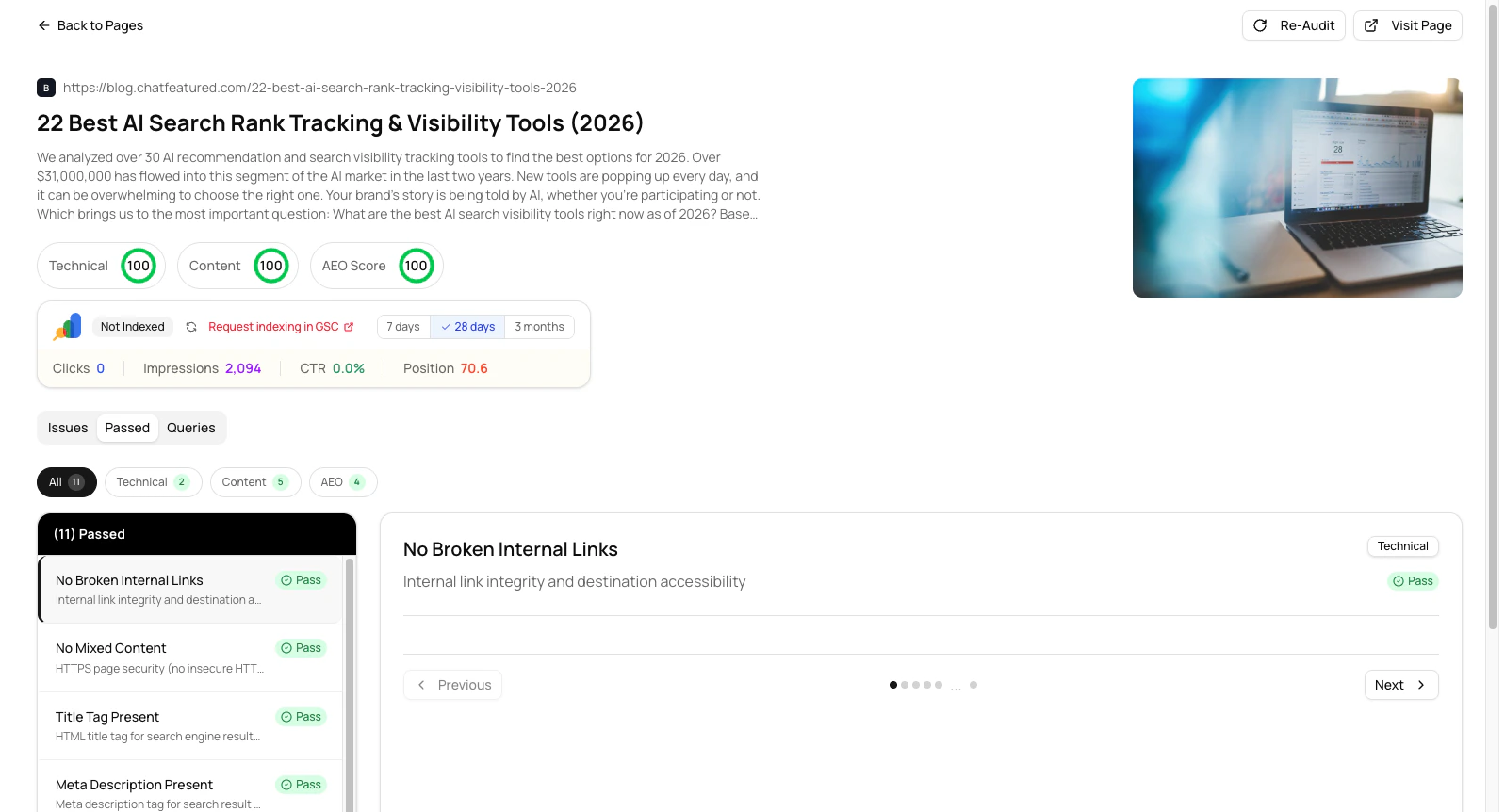 * **Page scores** - Technical, Content, and AEO scores for that specific page
* **Issues list** - All problems found, sorted by severity
* **Passed checks** - What the page is doing well
* **How to Fix** - Step-by-step instructions for each issue
* **Page scores** - Technical, Content, and AEO scores for that specific page
* **Issues list** - All problems found, sorted by severity
* **Passed checks** - What the page is doing well
* **How to Fix** - Step-by-step instructions for each issue
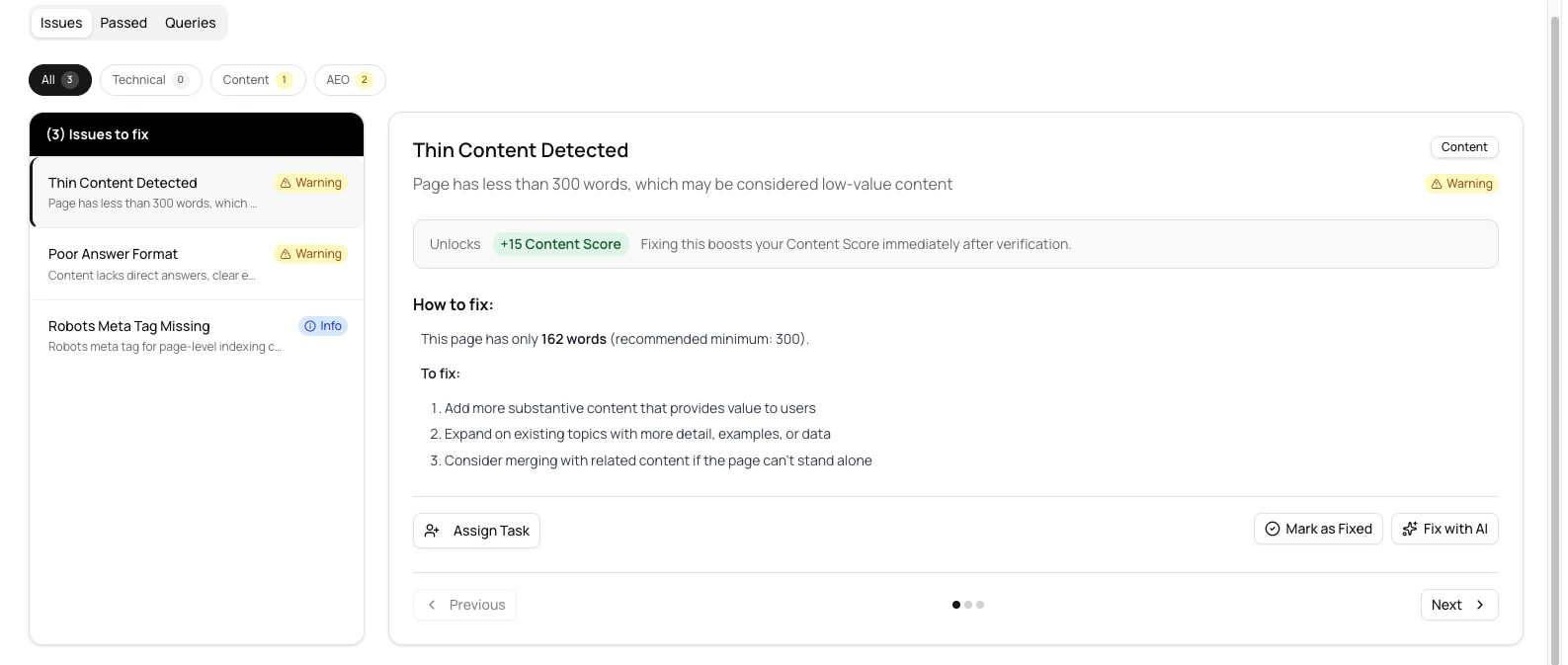 Each issue shows:
* What the problem is
* Why it matters for AI visibility
* Specific instructions to fix it
* The score impact when fixed
### Taking Action on Issues
When you click an issue, you'll see three action buttons:
Create a task and assign it to a team member for tracking and accountability
Track when you've manually fixed the issue
Let ChatFeatured suggest or generate fixes
### Tracking Progress Over Time
The Page Detail view shows historical tracking across three time periods:
See recent changes and quick wins
Track progress over a month-long campaign
Monitor long-term improvement trends and patterns
This helps you see if your fixes are actually improving scores over time.
## Managing Multiple Sites
If you have multiple domains or subdomains:
Click the site switcher in the top right of Site Audit
Click **Add Site** and enter new domain URLs
Use the switcher to compare audit results across domains
Each site maintains its own audit history and scores
## Assigning Tasks
Turn audit issues into actionable tasks for your team:
1. Click on any issue to expand details
2. Click **Assign Task** or **Add to Tasks**
3. Select a team member to assign
4. Track progress in your Tasks dashboard
## Re-Auditing
To check if issues have been fixed:
Click **Re-Audit** on any page detail view to check that specific page
Start a fresh audit to re-check everything
After making fixes, wait a few minutes before re-auditing to ensure changes have propagated.
## Best Practices
### Prioritize by Impact
### AEO-Specific Fixes
For better AI visibility, prioritize these AEO checks:
* **AI Crawlers Allowed** - Ensure GPTBot, ClaudeBot, and PerplexityBot can access your site
* **JSON-LD Structured Data** - Help AI understand your content with schema markup
* **Content Structure** - Use clear headings and internal links
* **Answer Format** - Structure content to directly answer questions
* **Citation Authority** - Include author info, sources, and expertise signals
### Scoring Targets
Aim for these minimum scores:
* **Technical: 95%+** - Ensures crawlability and security
* **Content: 90%+** - Makes content understandable to AI
* **AEO: 85%+** - Signals content is ready to be cited
Achieving these targets ensures your site is optimized for both traditional search and AI engines.
### Track Progress Over Time
Run audits regularly to:
* Catch new issues as content is added
* Verify fixes are working
* Monitor score improvements
* Identify recurring problems
**Recommended schedule:**
* After major content changes - Immediately audit
* Monthly comprehensive audits - Regular health check
* Ongoing monitoring - Watch for regressions on key pages
***
## FAQ
A typical audit takes 2-10 minutes depending on your site size. Quick audits of critical issues take 30-60 seconds.
No. ChatFeatured's crawler is rate-limited and respects your server resources. We won't impact your site's performance for real users.
You can audit any public website, but detailed tracking features require domain verification on Professional, Agency, or Custom plans.
Run audits after major changes immediately, do monthly comprehensive reviews, and enable ongoing monitoring for weekly or daily checks (depending on plan).
Check the Issues list to see what new problems were detected. Usually this means new content was added that needs optimization, or an existing issue was discovered.
Yes, you can export audit data from the Pages view. Export features vary by plan—check your plan details for what's available.
AEO requires structured data and answer formatting in addition to good content. You may have great content but lack JSON-LD markup or clear answer positioning.
Use schema.org markup with Article, FAQ, or HowTo schemas. Include author info, publication date, and clear answer sections. See examples in the Common Issues section above.
***
## Integration Benefits
### With Answer Engine Analytics
See which of your audited pages are appearing in AI engine results and how often they're cited.
### With Working with Prompts
Audit insights help you understand which prompts are working well and which pages need optimization for AI visibility.
### With AI Agents
Use audit data to guide your AEO Agent on which pages to focus on for optimization.
***
## Next Steps
See which pages AI engines are citing and track visibility trends
Create and optimize prompts based on your audit insights
Use the AEO Agent to automatically fix optimization issues
Connect your audit to WordPress, Cloudflare, and other platforms
Each issue shows:
* What the problem is
* Why it matters for AI visibility
* Specific instructions to fix it
* The score impact when fixed
### Taking Action on Issues
When you click an issue, you'll see three action buttons:
Create a task and assign it to a team member for tracking and accountability
Track when you've manually fixed the issue
Let ChatFeatured suggest or generate fixes
### Tracking Progress Over Time
The Page Detail view shows historical tracking across three time periods:
See recent changes and quick wins
Track progress over a month-long campaign
Monitor long-term improvement trends and patterns
This helps you see if your fixes are actually improving scores over time.
## Managing Multiple Sites
If you have multiple domains or subdomains:
Click the site switcher in the top right of Site Audit
Click **Add Site** and enter new domain URLs
Use the switcher to compare audit results across domains
Each site maintains its own audit history and scores
## Assigning Tasks
Turn audit issues into actionable tasks for your team:
1. Click on any issue to expand details
2. Click **Assign Task** or **Add to Tasks**
3. Select a team member to assign
4. Track progress in your Tasks dashboard
## Re-Auditing
To check if issues have been fixed:
Click **Re-Audit** on any page detail view to check that specific page
Start a fresh audit to re-check everything
After making fixes, wait a few minutes before re-auditing to ensure changes have propagated.
## Best Practices
### Prioritize by Impact
### AEO-Specific Fixes
For better AI visibility, prioritize these AEO checks:
* **AI Crawlers Allowed** - Ensure GPTBot, ClaudeBot, and PerplexityBot can access your site
* **JSON-LD Structured Data** - Help AI understand your content with schema markup
* **Content Structure** - Use clear headings and internal links
* **Answer Format** - Structure content to directly answer questions
* **Citation Authority** - Include author info, sources, and expertise signals
### Scoring Targets
Aim for these minimum scores:
* **Technical: 95%+** - Ensures crawlability and security
* **Content: 90%+** - Makes content understandable to AI
* **AEO: 85%+** - Signals content is ready to be cited
Achieving these targets ensures your site is optimized for both traditional search and AI engines.
### Track Progress Over Time
Run audits regularly to:
* Catch new issues as content is added
* Verify fixes are working
* Monitor score improvements
* Identify recurring problems
**Recommended schedule:**
* After major content changes - Immediately audit
* Monthly comprehensive audits - Regular health check
* Ongoing monitoring - Watch for regressions on key pages
***
## FAQ
A typical audit takes 2-10 minutes depending on your site size. Quick audits of critical issues take 30-60 seconds.
No. ChatFeatured's crawler is rate-limited and respects your server resources. We won't impact your site's performance for real users.
You can audit any public website, but detailed tracking features require domain verification on Professional, Agency, or Custom plans.
Run audits after major changes immediately, do monthly comprehensive reviews, and enable ongoing monitoring for weekly or daily checks (depending on plan).
Check the Issues list to see what new problems were detected. Usually this means new content was added that needs optimization, or an existing issue was discovered.
Yes, you can export audit data from the Pages view. Export features vary by plan—check your plan details for what's available.
AEO requires structured data and answer formatting in addition to good content. You may have great content but lack JSON-LD markup or clear answer positioning.
Use schema.org markup with Article, FAQ, or HowTo schemas. Include author info, publication date, and clear answer sections. See examples in the Common Issues section above.
***
## Integration Benefits
### With Answer Engine Analytics
See which of your audited pages are appearing in AI engine results and how often they're cited.
### With Working with Prompts
Audit insights help you understand which prompts are working well and which pages need optimization for AI visibility.
### With AI Agents
Use audit data to guide your AEO Agent on which pages to focus on for optimization.
***
## Next Steps
See which pages AI engines are citing and track visibility trends
Create and optimize prompts based on your audit insights
Use the AEO Agent to automatically fix optimization issues
Connect your audit to WordPress, Cloudflare, and other platforms