

Plans
Enterprise limits are set per deal. To talk about Enterprise, use Contact us for Enterprise on the Billing page (shown on Growth) or the pricing page. Team members cost nothing extra on any plan.
What counts against your limits
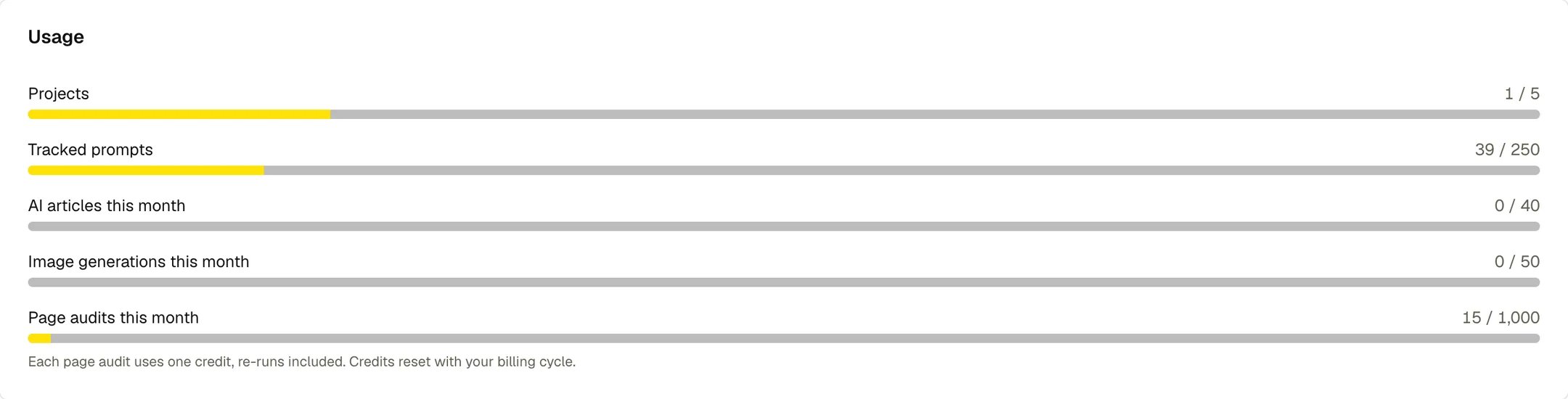
- Projects counts active projects. A deactivated project doesn’t count.
- Tracked prompts counts each active prompt once per country it runs in, across every project. A prompt tracked in three countries uses three. Paused prompts don’t count.
- Page audits counts every page the site audit checks, re-runs included.
The free trial
Starter and Growth start with a 7-day free trial. You enter a card at checkout, and nothing is charged until the trial ends. During the trial you can generate up to 5 AI articles; every other limit is the plan’s full allowance. Upgrade for full access ends the trial early and charges the plan price right away. When the trial ends, your card is charged and the subscription renews monthly from that date. The trial is once per workspace.Model add-ons
Claude and Grok can be added to a Growth or Enterprise workspace. An add-on tracks every project in the workspace on that engine. The Model Add-ons card on the Billing page shows the price. To add one, click Contact Sales next to it, and our team turns it on. To remove an active add-on, click Remove. Tracking on that engine stops, and you get a prorated credit for the rest of the cycle.Start a plan
If your workspace has no plan, the Billing page shows Starter ($150/mo)** and **Growth ($500/mo). Click one to open checkout.Upgrade or downgrade
Plan changes take effect immediately and are prorated.- Upgrade: click Upgrade to Growth ($500/mo), check the amount charged now, and click Confirm upgrade.
- Downgrade: open Change plan and choose Switch to Starter ($150/mo). Unused time on Growth is credited toward your next invoice.
Cancel your plan
- Go to Settings > Billing and click Open billing portal.
- Cancel your subscription in the Stripe billing portal.